The ELEGOO Saturn 4 Ultra 3D Printer is a resin-based 3D printer designed for creating detailed models. It utilizes MSLA Stereolithography technology with a COB light source and Fresnel collimating lens for precise curing of photopolymer resin. The printer is equipped with a 4.0-inch capacitive touch screen for operation and supports connectivity via USB interface and WiFi.
Function Description:
The Saturn 4 Ultra is primarily used for additive manufacturing, specifically for producing three-dimensional objects from liquid photopolymer resin. The process involves curing layers of resin using UV light, building the model from the bottom up on a build platform. The printer is designed to work with slicing software like Chitu Box, which prepares 3D model files (.stl type) for printing by generating layers and supports. The integrated AI Camera allows for real-time monitoring of the printing process and supports time-lapse photography, enhancing user control and observation capabilities.
Usage Features:
- Ease of Setup: The build platform is designed for self-leveling, making it ready for use right out of the box after being secured to the connecting block.
- Resin Management: Users are instructed to fill the resin tank with at least 1/3 of its volume but not to exceed the MAX line. The printer performs a self-check before printing, and it's crucial not to touch the machine during this process.
- Model Printing: After preparing the resin and covering the printer with its anti-UV cover, users can select a sliced test model for printing. The printer then proceeds to build the model layer by layer.
- Post-Processing: Once printing is complete, users should wait for the resin to stop dripping from the build plate. The build plate can then be lifted, and a scraper used to remove the model. ELEGOO also offers cleaning and curing machines for post-processing.
- Software Integration: The printer is designed to be used with Chitu Box slicing software, which can be installed from the provided USB flash drive or downloaded from the official website. This software allows users to open 3D model files, adjust viewing angles, size, and position, and configure printing parameters.
- Parameter Configuration: Within Chitu Box, users can select "ELEGOO Saturn 4 Ultra" as the default printer and adjust various parameters such as layer height, bottom layer count, exposure time, bottom exposure time, transition layer count, and transition type. These settings are crucial for print quality and success.
- Network Management: The printer supports WiFi connectivity, allowing users to connect it to a network management center via the slicing software. This feature enables remote control and monitoring of the printer from a computer, provided both devices are on the same local area network (LAN).
- AI Camera Monitoring: The built-in AI Camera provides real-time observation of the printing situation. Users can turn the camera on or off and control the time-lapse photography function through the printer management interface in the Chitu Manager software.
Maintenance Features:
- Resin Tank Care: It is essential to avoid using sharp or pointy tools to scrape the resin tank to prevent damage to the release liner film. The resin tank should be cleaned before switching to a different color of resin. If printing fails, excess cured resin must be cleaned from the tank, and the resin may need to be changed to prevent damage to the printer.
- Build Plate Cleaning: Before and after each print, the build plate should be cleaned with paper towels or alcohol to ensure it is free of bumps or burrs, which can affect print adhesion and quality.
- Machine Inspection: A daily check of the machine's exterior and all mechanical parts for any obvious damage, defects, or abnormalities is recommended before each printing session.
- Environmental Control: Maintaining a printing environment temperature of 25-30 degrees Celsius and ensuring good ventilation in the printing room is advised to facilitate heat dissipation and resin odor volatilization.
- Z-axis Lubrication: If the Z-axis produces friction noise, lubricant should be applied to the lead screw. This should be done at least every 2-3 months, with increased frequency if the printer is used more often.
- Resin Storage: If the printer will not be used for more than 48 hours, any remaining resin in the tank should be poured back into its original bottle and sealed. Any residue should be filtered out.
- Release Film Replacement: The release film is a consumable part and should be replaced regularly as prompted by the machine to maintain a high success rate of printing. Signs that the film needs replacement include whitening, scratches, or loss of elasticity.
- LCD Screen Protection: Care must be taken when removing the printing platform to avoid damaging the LCD screen. The service life of the screen is approximately 2000+ hours, but this can decrease with increased printing frequency. Regular screen cleaning and unplugging the machine after printing are important. If screen exposure issues or reduced service life significantly impact print quality, the screen should be replaced.
- Packaging Retention: The original packaging box should be kept for 30 days for potential returns or exchanges, as only ELEGOO original packaging boxes are accepted.
- Troubleshooting and Warranty: For any problems with the printer, users should contact ELEGOO customer support. Disassembling or modifying the printer independently will void the warranty, and any damage caused by personal operating errors will incur repair costs.

 Need help?
 General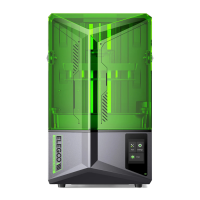










 To Next Page