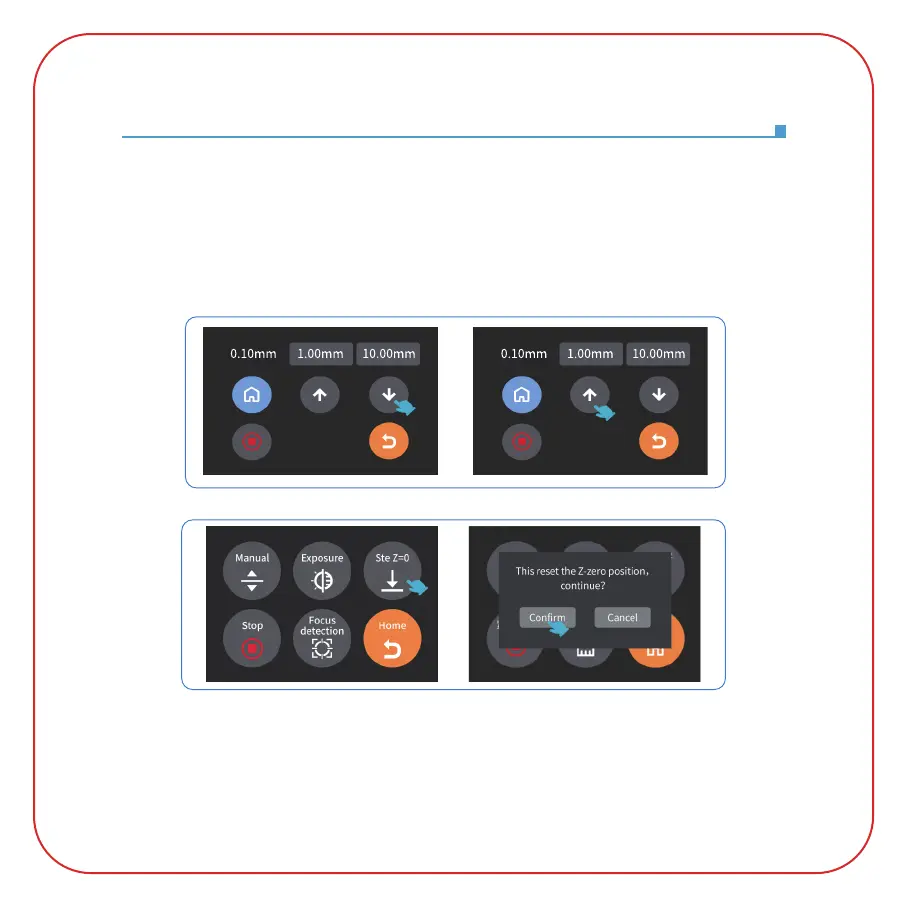
5. Since the distance between the printing platform and the tempered glass will
change during the process of tightening the build platform screws, if you find that the
MARS 4 DLP leveling paper can be pulled out without resistance, please click the
"down" button (in steps of 0.1mm) until there is slight resistance to pull out the
leveling paper. (See Picture 4) If there is too much resistance to pull out the
MARS 4 DLP leveling paper, please click the "up" button (in steps of 0.1mm) until the
leveling paper can be pulled out with slight resistance. (See Picture 5)
6. After completing the above leveling, set the current Z-axis position as the initial
height of the first layer of printing. Operate as follows: return to the previous
interface, and click "Set Z=0". At this time, a message will pop up on the touch screen,
(as shown in Picture 6). Then click "Confirm" to complete. (Note: "Set Z=0" only
works in print file mode.)
(Picture 4) (Picture 5)
(Picture 6)
此步骤将影响Z零点位置,是否继续?



 To Next Page