8
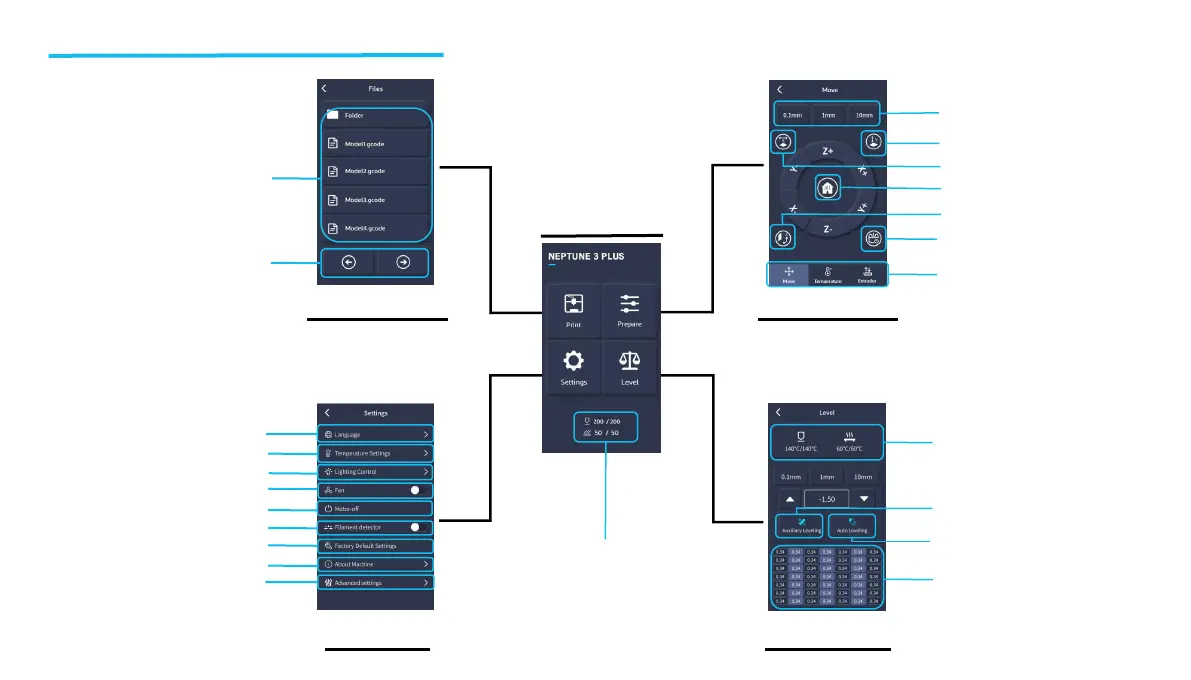
Lighting control
Operation Screen Introduction
Left and right page keys
Gcode file display
Print Documents
Main Interface
Prepare Interface
Set Interface
Level Interface
Temperature display
Three interfaces:
movement, temperature,
Extruder
Motor unlock
Reset to zero
Moving distance
Set Y=0
Set Z=0
Set X=0
Temperature display
49-point parameter display
Language switching
Preset temperature
Fan control
Motor unlock
Restore default parameters
Machine information
Filament detector control
Advanced settings
Automatic leveling to compensate
and calibrate the print bed
Align and calibrate the print bed
with hand-tightened knobs


 To Next Page