10
A
B
C
Print Head Feeding Check
1) First push the filaments to the bottom of the print head.
2) Click 【Prepare】 - 【Extrudert】, click 【Load】, the temperature of the
nozzle will be automatically heated to 200°C.
3) After the nozzle is preheated to 200°C, click the feed to extrude the filaments
from the nozzle.
4) Clean the melted filament of the nozzle before printing.
Model Test
Start printing
1) Insert the TF card into the card slot of the printer.
2) Click【Print】 on the main menu and select the model file.
3) When the nozzle and the heatbed reach the preset temperature, the
X, Y, Z axis will return to zero, and then start printing.
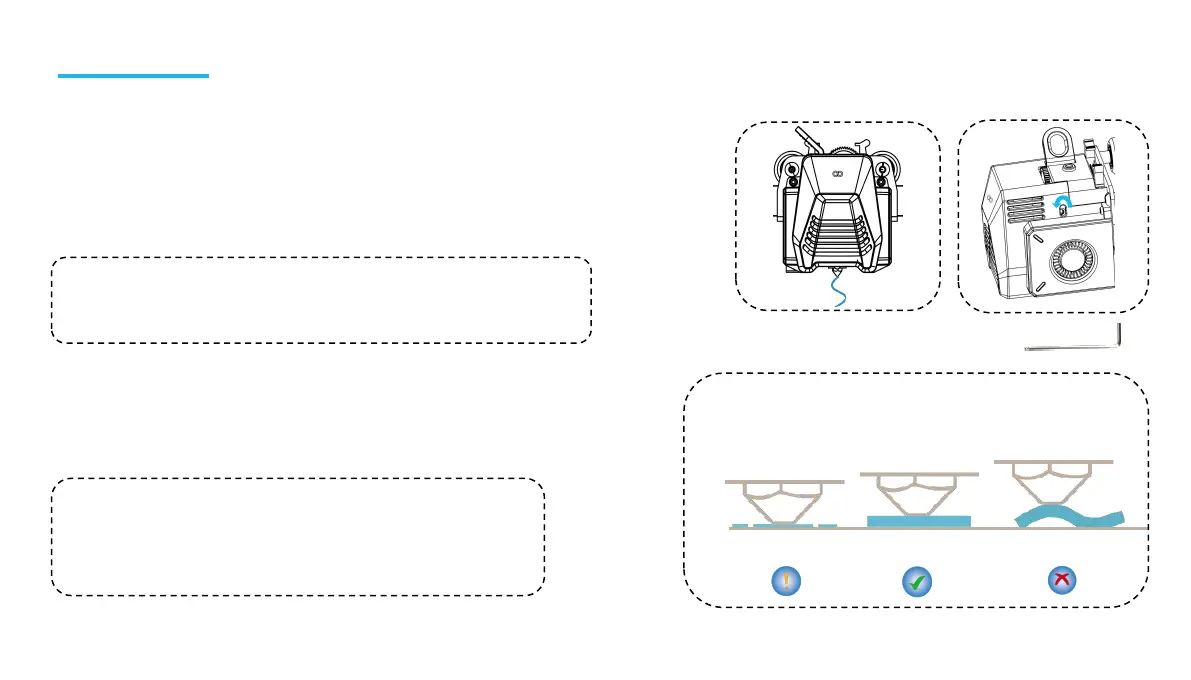
The nozzle is too
close to the
platform, resulting
in insufficient
extrusion.
The extrusion volume
and distance between
the nozzle and the
platform is proper
with uniform adhesion.
The nozzle is too far from
the platform and the
adhesion is insufficient,
the model may fall off the
platform during printing.
Notice:Consumables with different hardness have different requirements for
the spring strength. The spring strength of the extruder can be adjusted with
an Allen wrench. When turning counterclockwise, the spring strength is
increased, and the spring strength is decreased clockwise.
Notice:When printing the test model, please observe the first layer
printing. In cases A and C, the compensation settings are not properly
adjusted. Compensation adjustments can be made during printing to
adjust the distance between the nozzle and the platform. In case B, the
nozzle and the platform have reached a proper printing distance and
can continue printing.
2.5


 To Next Page