14
Online Print
l Connect the printer and computer with USB cable, double-click to open the slicing software, select the corresponding
model and then click on the monitor, if the interface shows a blank then it proves that the connection is not successful,
you need to install the driver.
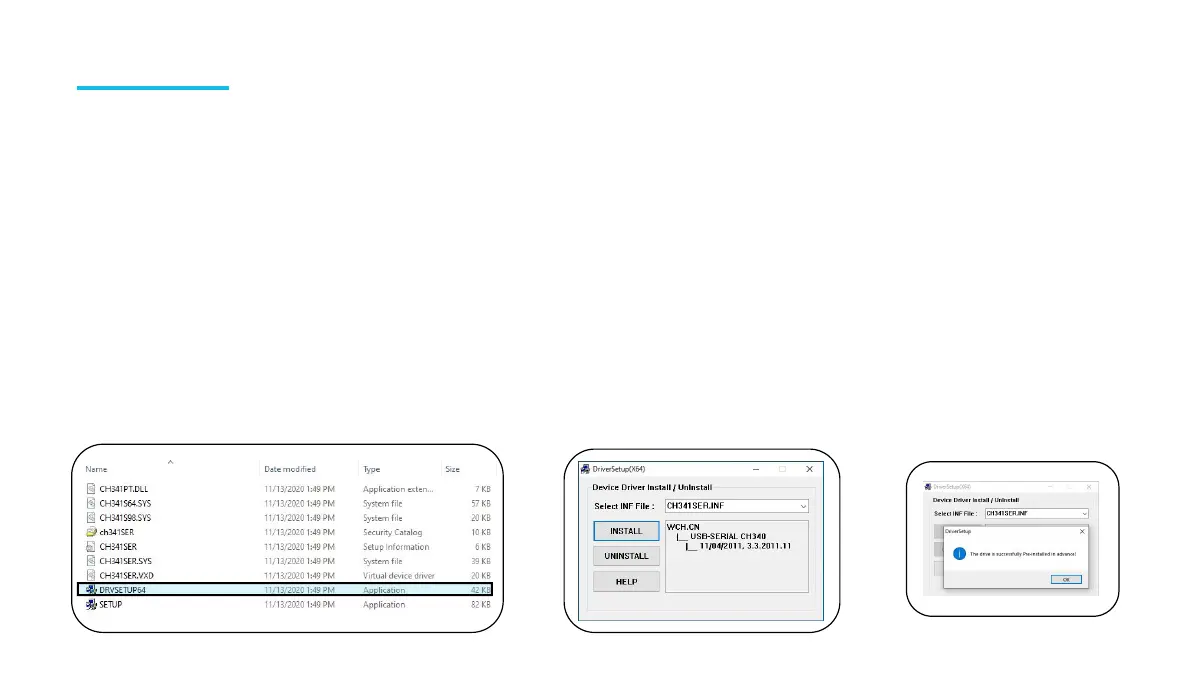
l The installation method of the driver, Window processes it as follows: Open the profile of the TF card to select the path \
Software and Software Driver Folder \ Software Driver Folder \ Window-USB Driver Folder\ CH340G USB Driver Folder
\ Double-click the [DRVSETUP64] file to run it and click to install it. (As shown in the picture below.) Please note that this
driver software has no virus, so please feel free to install it. If your antivirus software determines that it is a virus, you can
close your antivirus software for a while and then continue to install the driver software.
Please be sure to check the relevant data files in the TF card!












 To Next Page