22
3.4.1 Flow direction Selector (from January 2013)
3.4 Change of Flow Direction
Empty the pipe system so that it is un-pressurized and has no ow!
At the time of ordering, you must specify in which direction the Flow Monitor
shall be mounted i.e. from which side is the ow entering the Pipe Section and
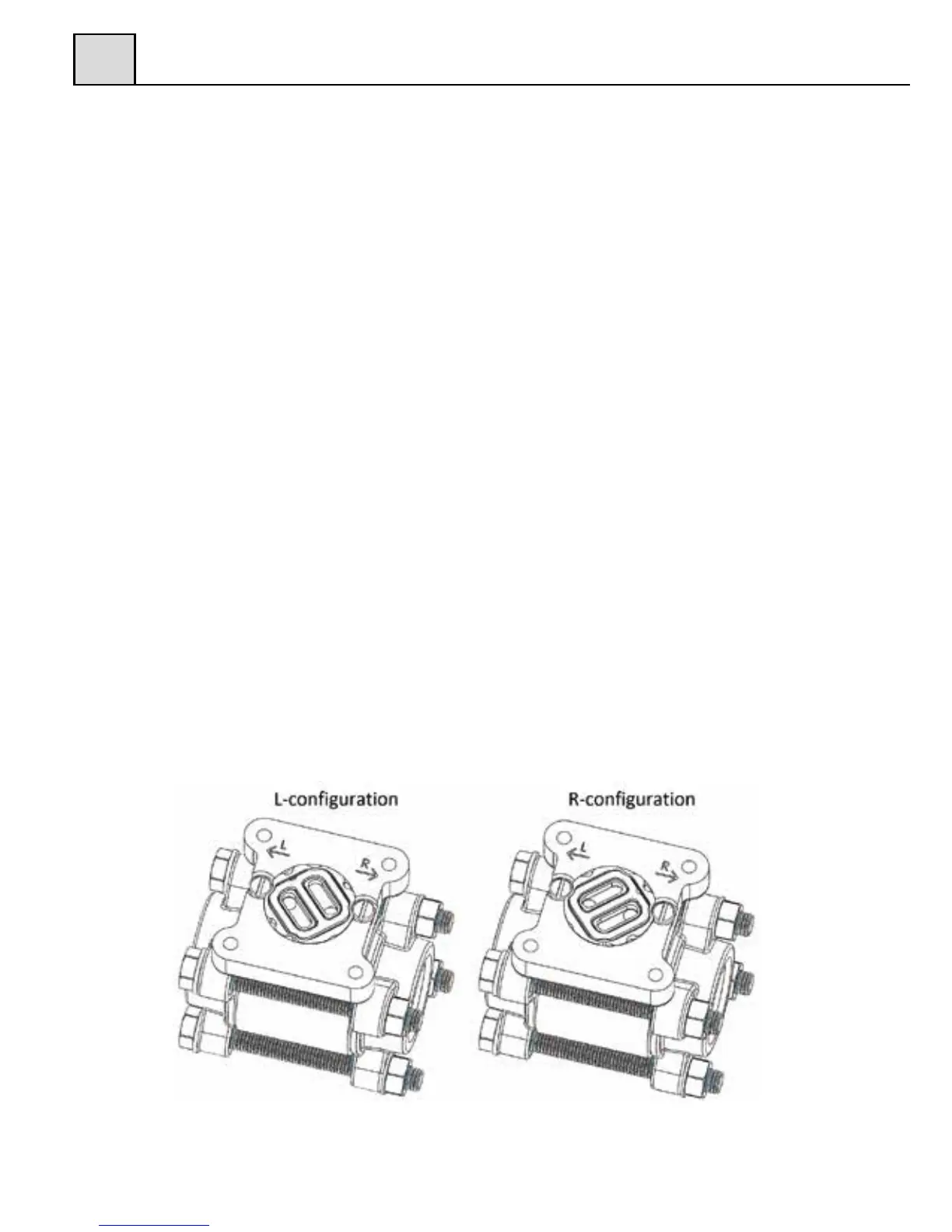
how you would like to read the scale. (Please refer to g. 6 below for alternatives.)
If, for some reason, the Flow Monitor is ordered with the wrong ow direction,
it is possible to change this in the eld.
GL- and FA-models are delivered with a ow direction selector that can be used
for both directions.
To change the direction, loosen the four (4) hexagon screw, which hold the di-
aphragm housing to the Pipe Section. Remove the diaphragm housing and you
will see the ow direction selector (it might have attached itself to the bottom side
of the diaphragm housing). Replace the ow direction selector in the conguration
for your system (see g. 6).
Please also remember to turn the red arrow mounted on the Pipe Section
(-GL and –FA models), to align with the new ow direction.
Figure 6
3


 To Next Page