Note!!! An authorized professional person should make all electrical
installations.
This section is not valid for the models S02 and S05 as these are Monitors wit-
hout any micro switches installed and work without the need of electrical po-
wer. Before you connect any cables, please make sure that you have the right
power supply within the specifications (see section 1.2 “Specifications”).
All terminal block connections are to be made through the included cable
gland PR22,5/PG16 (and please note that you can have two alternative moun-
tings of the cable gland depending on what side you want to enter with the ca-
bles). If you install the Flow Monitor in an Ex-hazardous area, please make
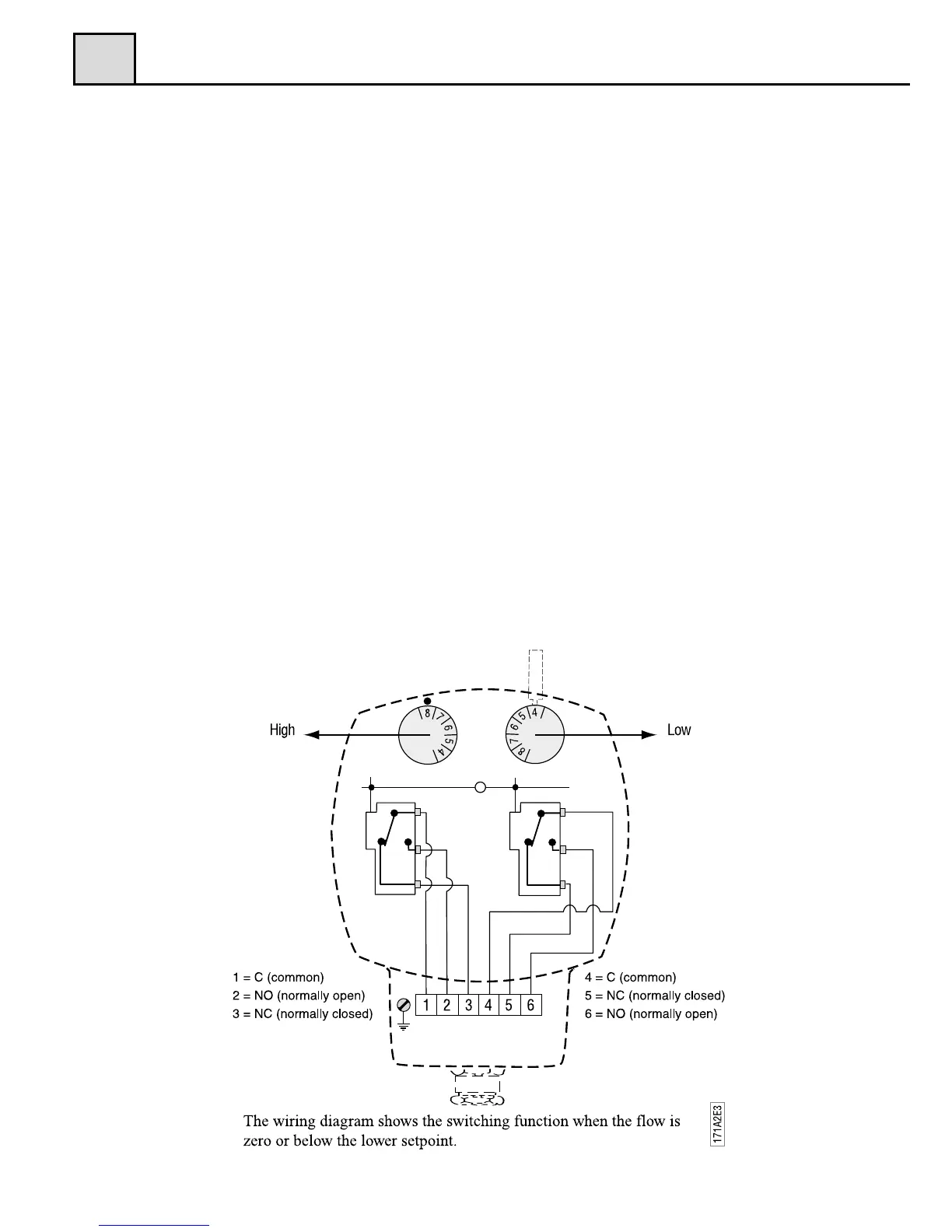
sure to follow local installation procedures and regulations. The terminal
block connections are described in fig.5 below. A grounding screw is to be
found at the side of the terminal block.
Before any circuit is connected/disconnected, make sure that all power is
off!


 To Next Page