28 - ET8/480, ET8/480S and ET8/480PT - TECHNICAL MANUAL
11. USER INTERFACE
11.1 General introduction
When control unit is started for the first time give enabling system status. Keyboards interested to the programmation,
automaticaly go out to "TIMEOUT" operative status, after 15 second from the last pressed key or gived command.
"USER NUMBER" is the two digit ( from 01 to 32) identification number of the user in access to command keyboard, the
user number must be followed by a 6 digit personal code wich allow the full recognition from the control unit.
"PROMPT" or "WELCOME MESSAGE" is defined the standard visualization with system in rest and no anomalies. The
second line can be customized with the installer name, for example:
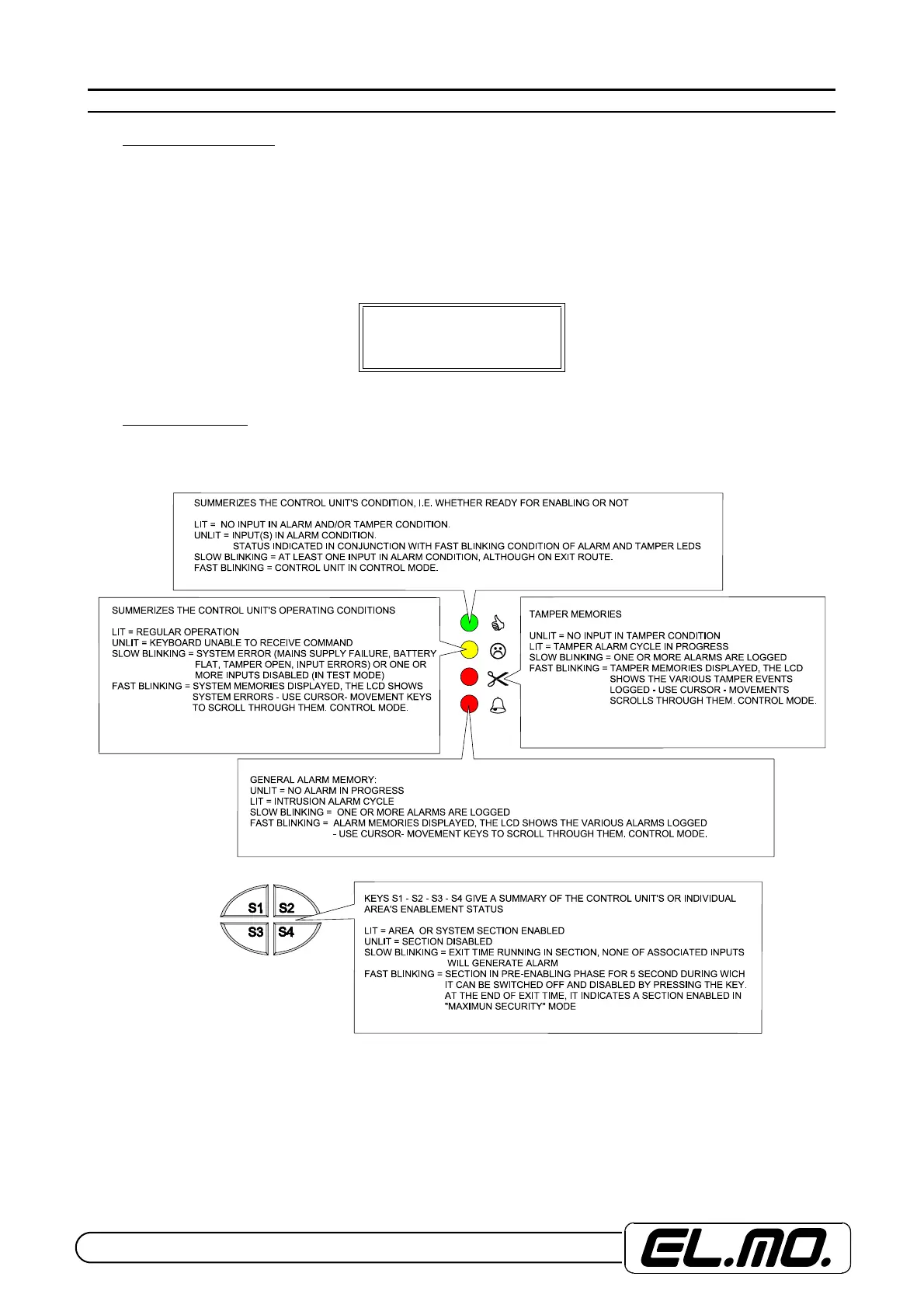
11.2 Led visualization
Command devices LED warning lights defined as system and area terminals
VE25/01/03 20:45
ACME SECURITY


 To Next Page