34 - ET8/480, ET8/480S and ET8/480PT - TECHNICAL MANUAL
15. RELEASE UPDATE
Programming step which permits the up-dating of the programme version without having to carry out the inconvenient
replacement of the EPROM memory. For such purposes, it is necessary to avail of a portable lap-top PC with the specific
browser WABL0032/CD or with WINASSIST programme correctly installed and operated.
In order to complete the operation successfully, it is necessary to follow the indications below:
A= Avail of either a portable lap-top or a fixed PC in case the operation were taking place in a laboratory.
B= Find the file with ".BIN" extension containing the controlunit’s programme’s new version. The most updated
version can be requestied for free to the manufacturer and be sent by e-mail.
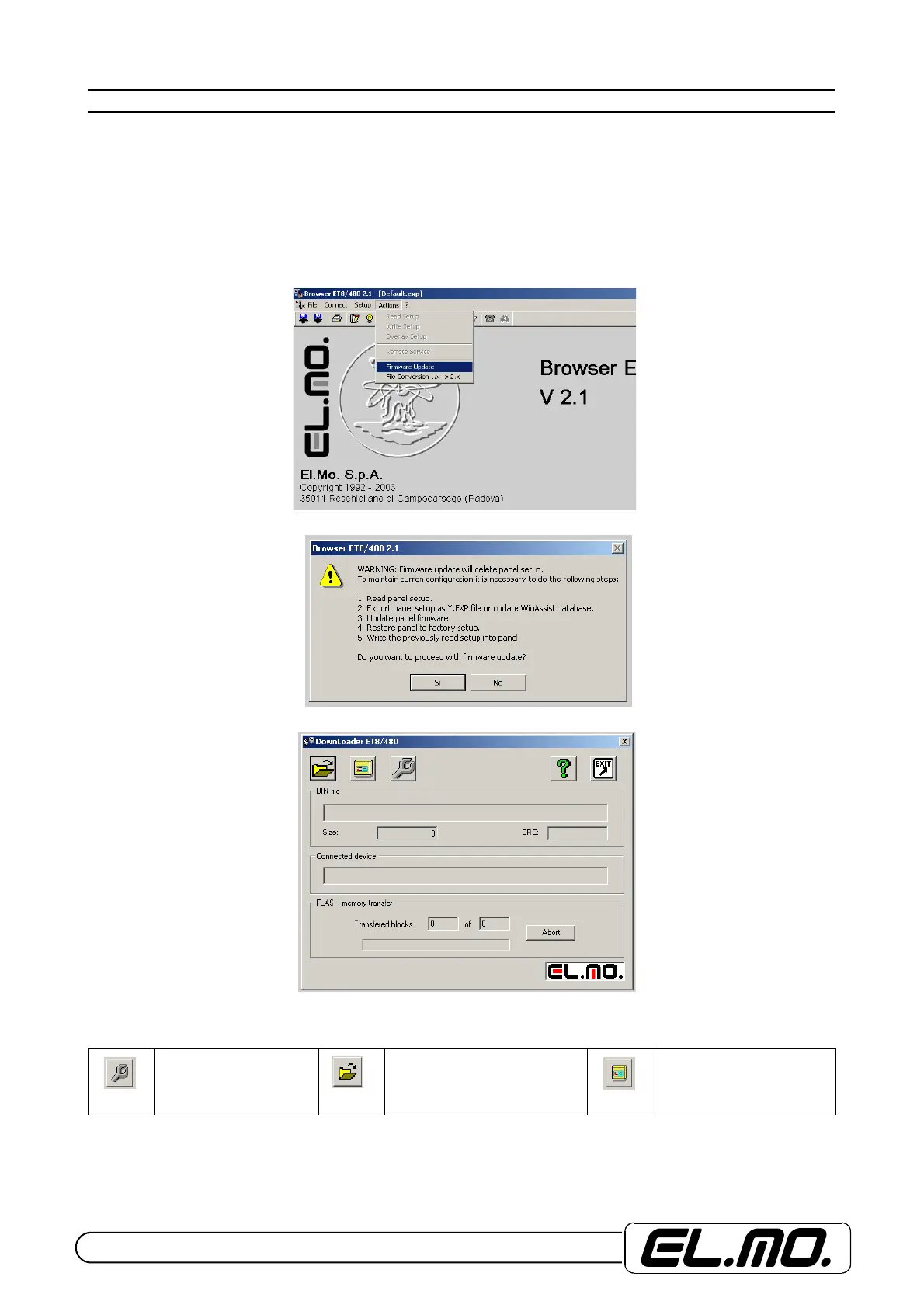
C= Activate the browser and select "Control unit release update" in the action menu.
D= Read carefully the message visualized.
Press Yes to procede and have below’s.
The three main icons stand for:
Serial communications
port choise.
Opening of file to be
downloaded in the control
panel’s memory.
Activation of firmware
downloading procedure.


 To Next Page