ET8/480, ET8/480S and ET8/480PT - TECHNICAL MANUAL - 35
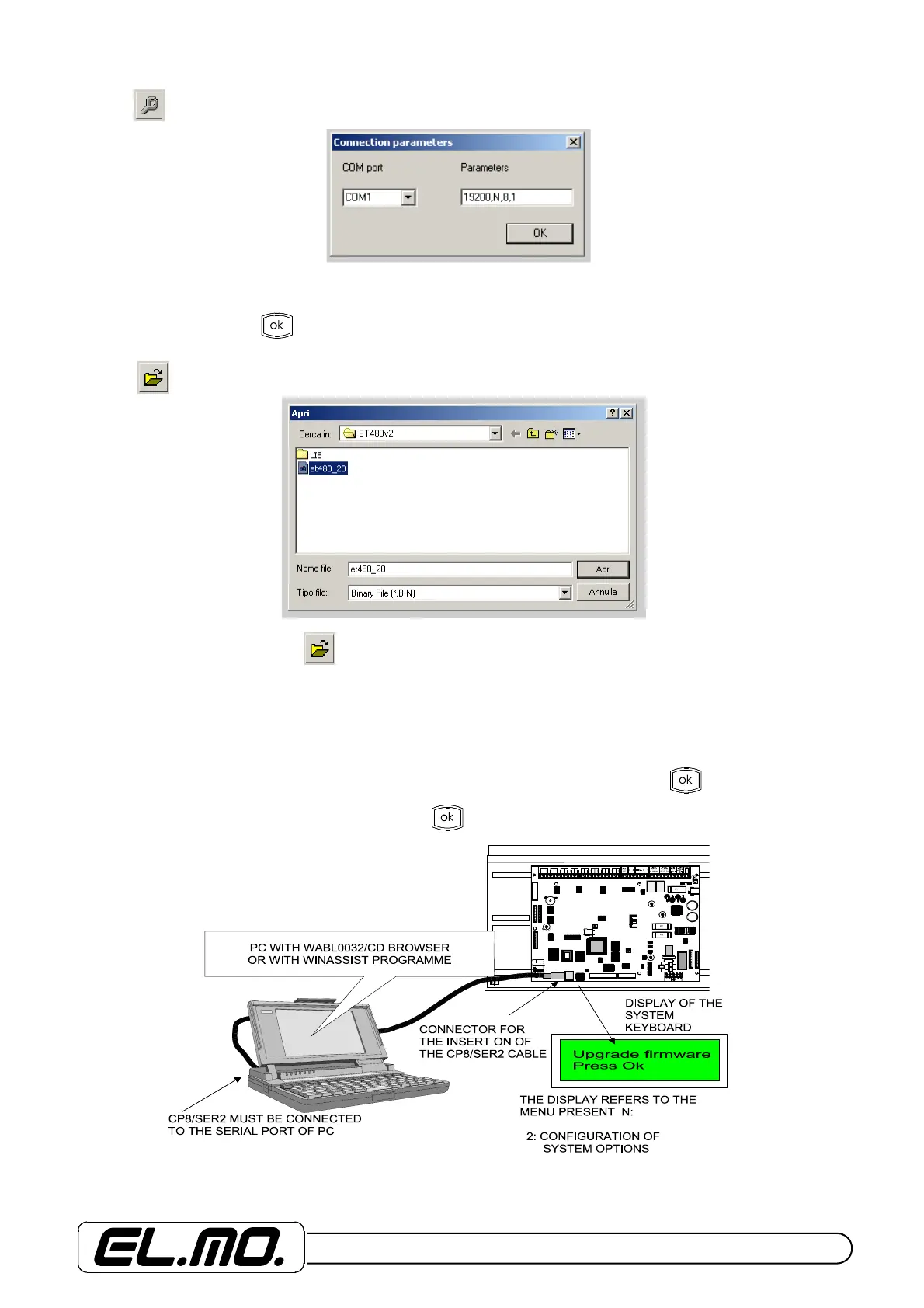
Select icon first to check the correct parameter of the communication port.
Pay the maximun attention to the communication port visualization. Writing must be clean and free from strange caracters,
that may cause incorrect inizialization. Choose a different port to clean the writing and then go back to COM port. If the
writings appear clear press key.
Select icon for file loading. The following window will be displayed:
In case it were not visualized, use key many times to enter the directory indicated by:
C:\Programs\ELMO\ET480v1L in case of WABL0032/CD programme
C:\WINAS\BROWSERS\ET480v1 in case of WINASSIST programme
Select the specific Bin file for the control unit and press APRI.
Connect CP8/SER2 cable to connect PC and control unit, enter programming through MODO COMANDO, press the 2 key
and one of the arrow key up to the "CONFIGURAZIONE OPZIONI SISTEMA" menu. Press Key and downwords
arrow key to enter "Aggiorna release" menu last press . key as indicated below.


 To Next Page