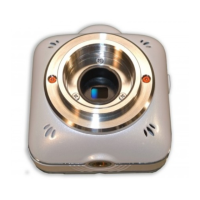
This camera is equipped with a built-in battery.
* The battery cannot be removed by the user.
* The battery is not fully charged at the time of purchase. Charge the battery fully before
starting to use the camera.
1. Make sure that the power of the camera is off. (Charging is not possible when the
power of the camera is on.)
2. Open the Interface Terminal Cover and connect the micro USB plug (smaller one) of the
supplied USB cable to the USB port.
3. Connect the USB plug of the USB cable to a USB port on your running computer.
Charging will automatically start. The Power LED on the camera turns red while
charging.
4. The battery is fully charged when the Power LED turns off.
The battery capacity decreases as time goes when the camera is turned on after
connecting to the USB port of your computer. In this case, long time continuous use
of the camera is not possible.
If you want to use the camera continuously for long time, use the dedicated AC
adapter (option). The battery capacity does not decrease by time.
(Make sure to use the dedicated AC adapter. The camera may not start when a
commercially available AC adapter is used.)



 To Next Page