Menu Remark Required
Yes/No
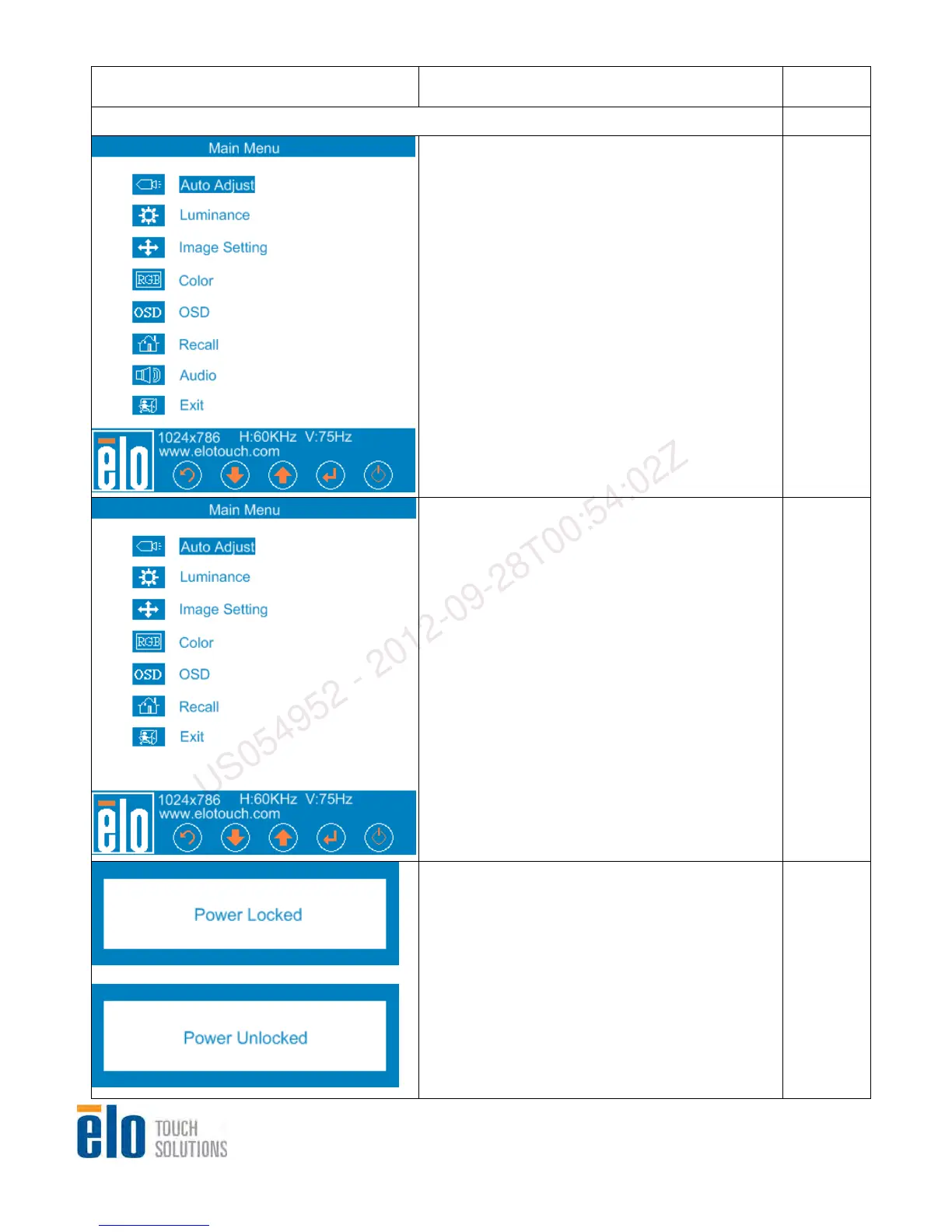
1.0 Main Menu
1. When Main Menu is not displayed, Press
“Menu” then main menu will display.
2. The OSD position should be on the right
bottom and the buttons on OSD should be
aligning to the physical buttons on the bottom.
Yes
1. Audio item will be disappeared if audio
function is not supported.
2. The OSD position should be on the right
bottom and the buttons on OSD should be
aligning to the physical buttons on the bottom.
Yes
1. Press the “Menu” and “-” keys for two
seconds to toggle the monitor’s Power
Locking feature between locked and
unlocked. This feature allows end-users no
access to the monitor’s power controls. The
OSD will show an “Power Locked” message
for 5 seconds when becoming locked, and
will show an “Power Unlocked” message for 5
seconds when becoming Yes unlocked.
While the power is locked, pressing the power
switch will have no effect on the monitor.
Default setting is unlocked.
Yes
Service Manual: ET1517L, ET1717L
ES600904 Rev B, Page 8 of 44
US054952 - 2012-09-28T00:54:02Z


 To Next Page