Need help?
Do you have a question about the EMC B Series and is the answer not in the manual?
Provides a general overview of the DS-300B switch, its scalability, and compatibility with other switches in SAN environments.
Details the key hardware and software features of the DS-300B, including chassis, cooling, port scaling, and technology support.
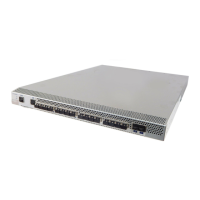
Illustrates and describes the components located on the port side of the DS-300B, including LEDs, ports, and receptacles.
Describes the nonport side of the DS-300B, which is dedicated to airflow, and mentions the location of agency and OEM labels.
Explains the DS-300B's support as an edge device within fabrics, detailing the maximum number of switches it can connect to.
Covers the licensing model for activating additional ports on the DS-300B, including default port enablement and licensing procedures.
Explains the Interswitch Link (ISL) Trunking feature, its licensing, and how to create trunked groups of contiguous ports.
Lists the standard items shipped with the DS-300B, including the switch unit and accessory kit contents.
Outlines the basic installation methods for the DS-300B, including standalone and rack-mounted options, and general safety precautions.
Specifies the electrical requirements for installing and operating the DS-300B, including power outlet, circuit, and grounding details.
Details the environmental requirements for the DS-300B, focusing on cooling, airflow, and ambient temperature to ensure proper operation.
Provides requirements for installing the DS-300B in an EIA cabinet, covering rack unit size, grounding, airflow, and stability.
Lists the necessary items for configuring and connecting the DS-300B, including cables, workstation, and optional FTP server.
Provides step-by-step instructions for installing the DS-300B as a standalone unit on a flat surface.
Describes two methods for installing the DS-300B into an EIA cabinet using a rack mount kit.
Offers recommendations for organizing and managing cables for the DS-300B, focusing on bend radius, slack, and securing methods.
Explains how to use the EZSwitchSetup utility for basic configuration of the DS-300B in a single-switch setup.
Details the procedure for connecting power to the DS-300B and describes the expected behavior of status LEDs during the boot process.
Guides users on establishing a serial connection to the DS-300B for configuration, including terminal emulator settings.
Explains how to configure the DS-300B's IP address using DHCP or a static IP address, supporting both IPv4 and IPv6.
Describes how to set the current date and time on the DS-300B for logging and troubleshooting purposes.
Details the procedure for powering the DS-300B switch on and off by connecting or disconnecting the power cable.
Explains how system activity and status are indicated by the various LEDs on the DS-300B switch.
Summarizes the different LED states (color, steady, flashing) for power status, system status, Ethernet, and ports, with recommended actions.
Describes the Power-On Self-Test (POST) process, its duration, and the steps involved in booting the switch.
Provides guidance on verifying the success of POST by checking switch LEDs, prompts, and system logs for errors.
Identifies the Field Replaceable Units (FRUs) for the DS-300B, noting that only SFPs are field replaceable.
Discusses the minimal maintenance required for the DS-300B and emphasizes ensuring environmental conditions are met.
Details the management functions and tools available for monitoring the DS-300B switch, including CLI, Web Tools, and other options.
Lists the physical specifications of the DS-300B, including its height, width, depth, and weight.
Provides details on the memory types and capacities installed in the DS-300B, such as main memory and compact flash.
Outlines the necessary facility conditions for the DS-300B, covering electrical, thermal, and cabinet requirements.
Presents a table detailing the data transmission ranges for different cable types and port speeds supported by the DS-300B.
Specifies the acceptable environmental conditions for both operating and non-operating states of the DS-300B.
Describes the Fibre Channel ports' compatibility with SFPs, operating speeds, and adherence to safety standards.
Details the specifications of the serial port on the DS-300B, including its connector type and communication parameters.
Lists the specifications for the DS-300B's universal power supply, including input voltage, frequency, and power consumption.
Advises on using only tested and supported SFPs and HBAs for the DS-300B, referring to the EMC Support Matrix.
Provides a comprehensive list of general system specifications for the DS-300B, covering architecture, processor, memory, and ports.
Covers the regulatory compliance requirements for the DS-300B, referencing specific warnings and statements for different regions.
 General
| Product Type | Storage Area Network (SAN) Switch |
|---|---|
| RAID Levels | Not Applicable |
| Protocols | Fibre Channel |
| Speed | 8 Gbps |
| Management | Command Line Interface (CLI) |
| Scalability | Scalable to full fabric architecture |

 To Next Page