5.4 USING THE HEADPHONE
Once the Headphone is connected to your phone (see 3.3), the next time you
turn on Bluetooth and the Headphone is turned ON, your phone will automati-
cally connect with the Headphones again.
To turn on the Headphone, simply press the big button on the Headphone
briey. When held closely or over your ears, you can hear a rising tone indicat-
ing the headphone is turned ON. When you press the button and you hear a
descending tone, it indicates it is shutting down.
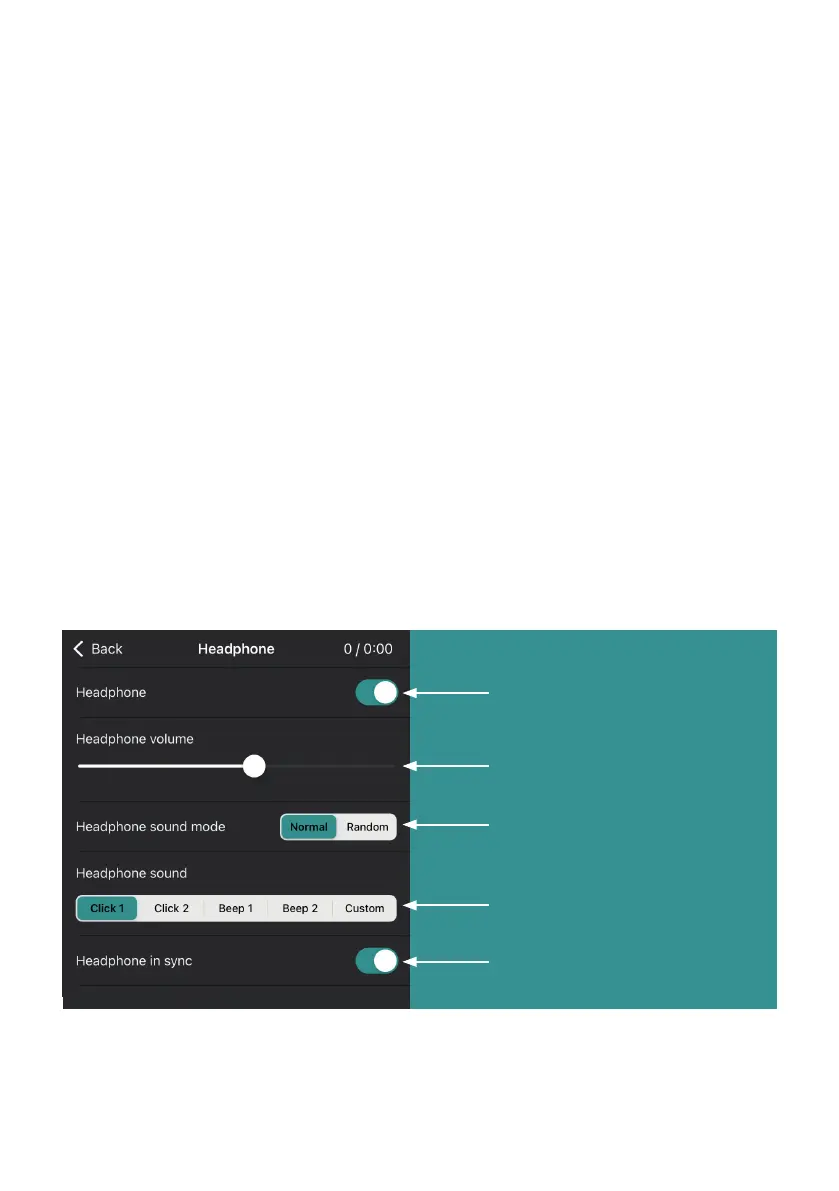
Click on the Headphone icon in the main menu of the app to open the corre-
sponding submenu. The settings for the headphones can be adjusted in this
menu. This allows you to adjust the volume and choose from dierent
sounds. You can also choose a random sound interval and you can set the
speed of the headphones independently of the Lightbar with the option
‘Headphone in sync’.
Turn Sound on or o
Sound volume
(Adjust with the +/- buttons)
Sound mode
- Normal for regular interval
- Random for random interval
Sound type
Sound in or out sync with
Light tube. Turn o to
adjust speed separately
12


 To Next Page