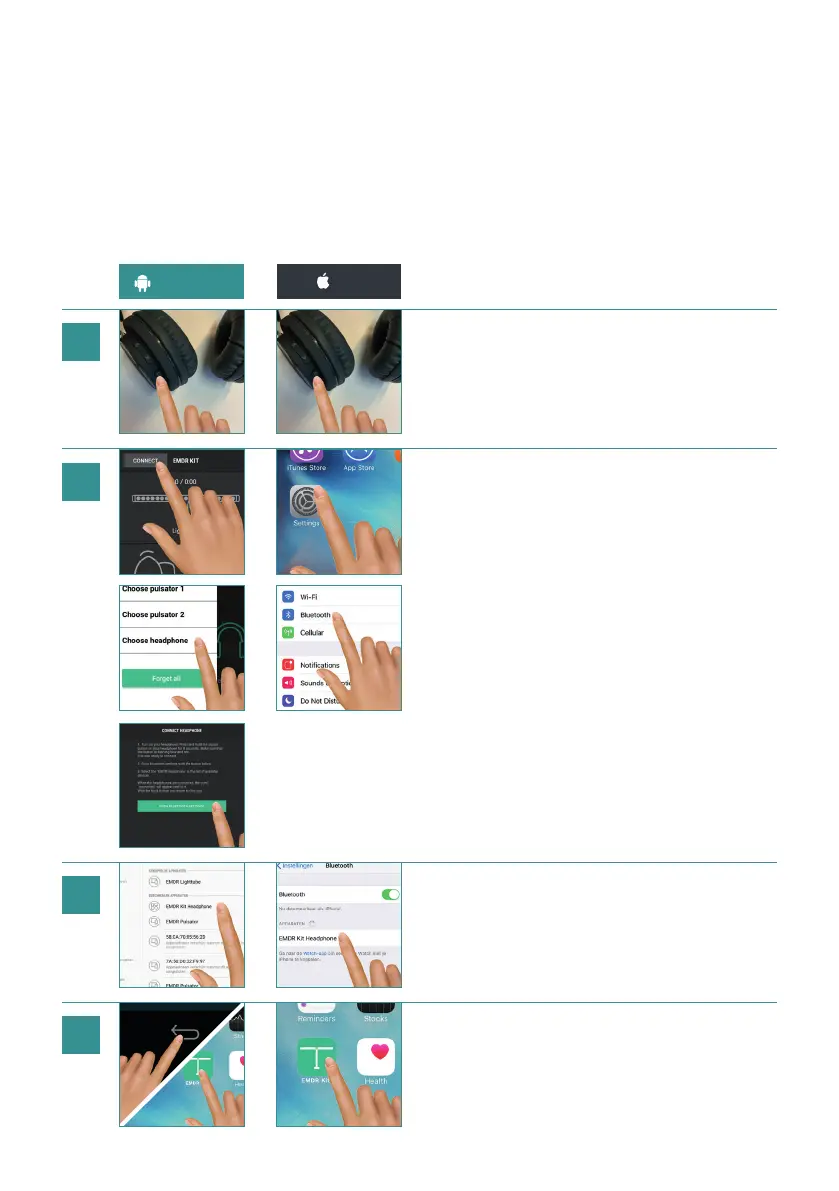
4.3 CONNECTING THE HEADPHONE
Make sure Bluetooth is turned on on your phone. When connecting, hold the
phone close to the Headphone.
Hold the button on the Headphone for 1-2 seconds
until the light on the bottom of the Headphone
starts ashing blue and red. The Headphone is now
ready to connect.
Android: Click on CONNECT in the app.
Click on ‘Choose Headphone’ and then
on OPEN BLUETOOTH SETTINGS.
iOS: Close the app, open settings and then open
Bluetooth settings.
Select the EMDR Kit Headphone in the list ‘My
devices’. When the Headphone is connected, the text
‘connected’ will appear next to it.
Return to the EMDR Kit app.
ANDROID iOS
4
1
2
3
8


 To Next Page