4.4 SHUTTING DOWN AND BATTERY SAVING
The parts will stay connected to the phone when the app is closed. It is important
to switch o or disconnect the EMDR Kit after use, for example at the end
of the working day. In this way you ensure that the batteries last longer and
the equipment is available again for your colleagues. Go through the following
steps to disconnect:
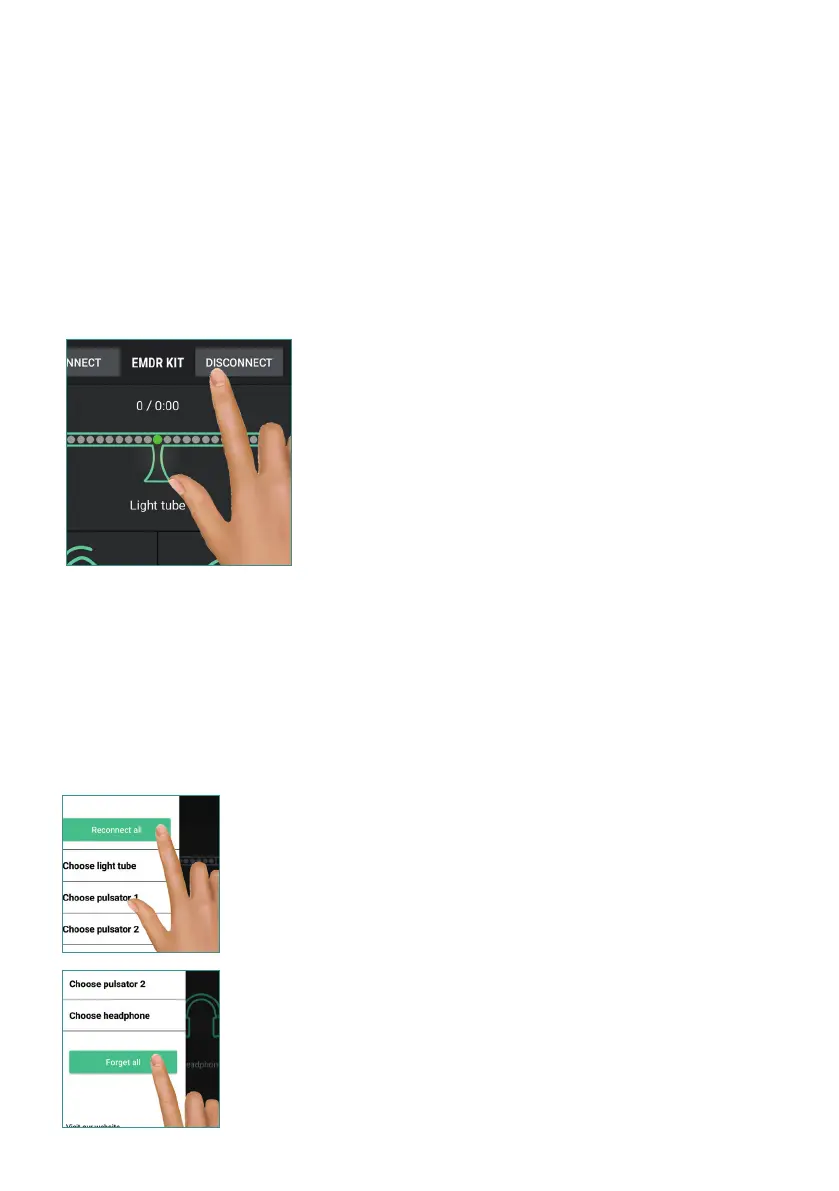
1. Press the DISCONNECT button to disconnect the parts from your
phone.
Instead of using the DISCONNECT button, the app can also be
closed completely. For Android devices, this can be done by press
-
ing the overview button and closing the app. With iOS devices, you
can press the home button twice in succession and then swipe
away the app.
2. Turn the Light Tube OFF by briey holding the button on the side
of the Light Tube. After disconnecting, the Pulsators will ash blue
for 30 seconds and then switch o automatically.
3. Turn o the Headphone by briey holding down the button on the
Headphone.
4.5 RECONNECTING
To reconnect, open the app. It will automatically try to connect to the parts it was
previously connected with. Please note that the Light Tube and Pulsators must be
switched ON to be able to connect. Turn on the Light Tube using the on/o button
and shake the pulsators so that they are activated.
Reconnect to all previously con-
nected components with the
RECONNECT ALL button in the
CONNECT menu.
This also happens automatically
when you open the app.
Clear all connected devices with
the FORGET ALL button in the
CONNECT menu.
This may be necessary if you want
to connect to a dierent Light
Tube, for example at a dierent
location.
9


 To Next Page