4
5
CONNECTING WITH THE EMDR KIT
4.1 CONNECTING THE LIGHT TUBE
Make sure that Bluetooth is enabled on your phone. Hold your phone close
to the Light Tube when connecting.
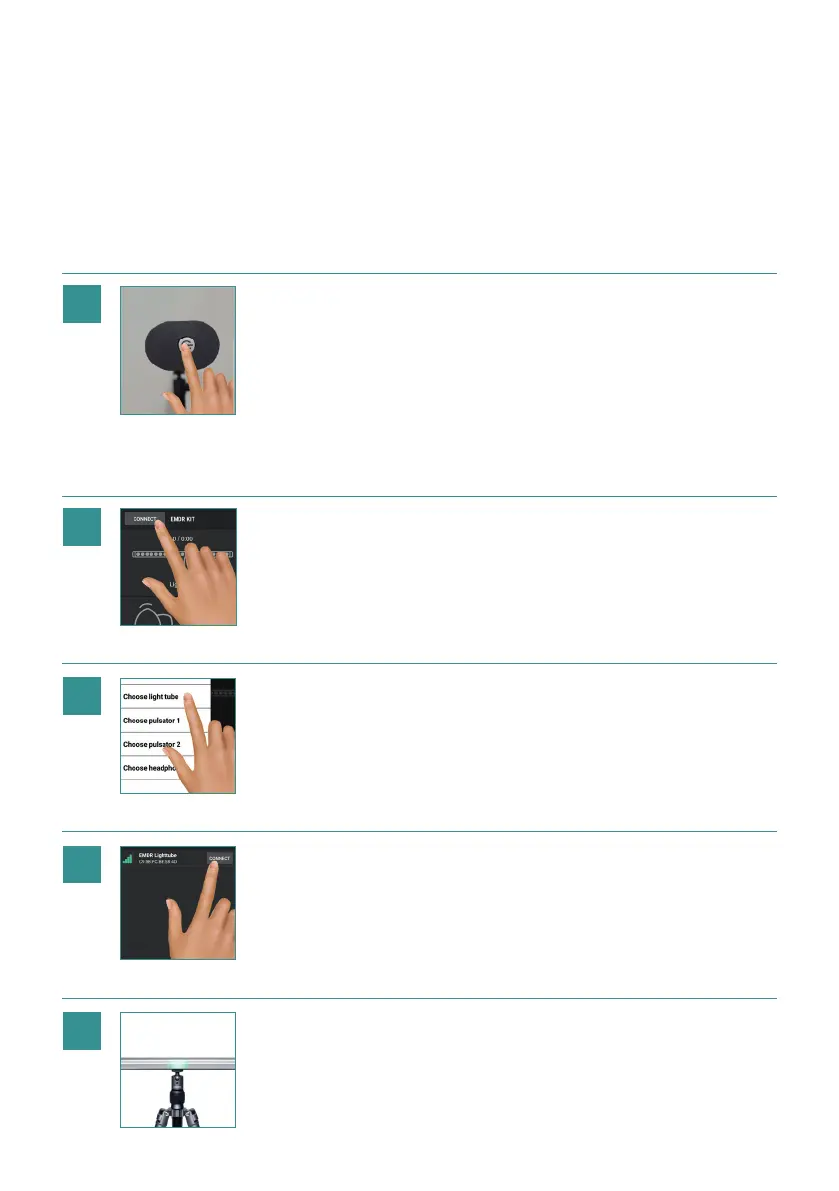
Turn the Light Tube ON by brie y
holding the button on the right side
of the Light Tube. A blue light will
ash on the button as well as on
the Light Tube, indicating that it is
ready to connect. A LED light will
appear on the light tube brie y,
indicating the current battery status
of the Light Tube. Green means that
it is fully charged and Red means
the battery of the Light Tube is
almost empty. When activated but
not connected, the Light Tube will
turn o automatically after 10 mi-
nutes in order to save the battery.
1
2
3
Click on:
Choose Light Tube.
In the EMDR Kit app,
click on: CONNECT
Select the Light Tube with the
strongest signal indicated by the
green bars.
The Light Tube will now be
connected. A luminous dot
should appear in the middle of
the Light Tube. The button on
the side of the Light Tube will
turn a stable blue.
6


 To Next Page