4
5
6
7
1
2
3
4.2 CONNECTING THE PULSATORS
Make sure that Bluetooth is enabled on your phone. Hold your phone
close to the Pulsators when connecting.
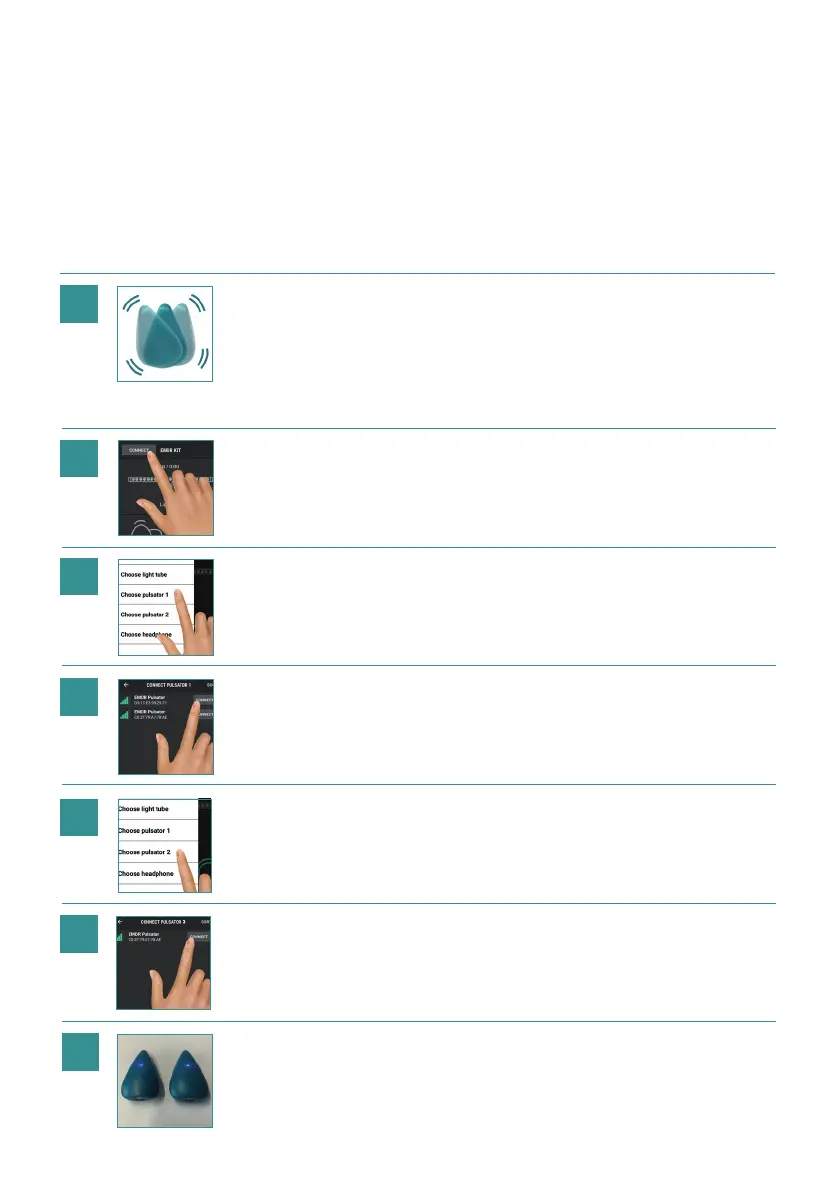
Shake the pulsators. This will acti-
vate them and they will be able to
connect for 30 seconds. The Lights
on the Pulsators will ash blue, indi-
cating they are ready to connect.
After 30 seconds, they will shut
down again if not connected.
In the EMDR Kit app,
click on: CONNECT
Select one of the Pulsators with
the strongest Bluetooth signal
indicated by the green bars.
Then click on:
Choose Pulsator 2
Select the other Pulsator.
The Pulsators are now connected. To
verify if the Pulsators are connected,
take them out of the dockingstations.
When connected, the lights on the
Pulsators turn a stable Blue.
Click on:
Choose Pulsator 1
7


 To Next Page