EMC-60 User Guide
- 2 -
Quick start guide
4
Touch . The LINE TEST LED will
turn on and the phone go off-hook. Wait for
dial tone then use the keypad to dial a test
number (e.g. a mobile phone). The phone
should hang-up when the called party
disconnects or touch .
5
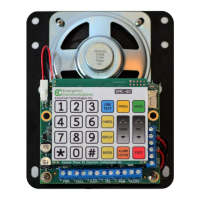
Phone line (TEL)
Power (PWR)
Phone push button (CALL)
LED
PLM (Phone Line Monitoring)
With power & battery connected, the green
‘PWR’ LED should be on and the red ‘ALARM’
LED should be off. Wake up the keypad by
touching . The WAKE LED will turn
on.
Select for program mode. The
PROG LED will turn on with the prompt
“Program”.
Touch then . If
the phone voice response is “Normal” or
“Charging battery” the phone is ready for
testing.
Enter the Station Number: (low
Touch . Key-in the Station # after
the prompt “Station Number”. Requires
station # 1 to provide the prompts.
Touch
Record the Location Announcement:
Touch . After “Location
Announcement .. beep”, record the location,
cab number and that help is required, then
touch .
Verify with
Enter the Secondary Phone Number:
Touch . Key-in the phone
number after the prompt “Secondary Phone
Number”, then touch
6
7
8
1
2
3
4
Enter the Primary Phone Number:
Touch . Key-in the phone
number after the prompt “Primary Phone
Number”, then touch


 To Next Page