EMC-60 User Guide
- 13 -
Cmd
Command Range Default
34 Voice Detection
Threshold
0 = Soft voice-activated speaker
9 = High threshold
3
35 Line Type 0 = “Quiet” phone line
1 = “Regular” phone line
2 = “Noisy” phone line (static)
1
36 Sounder 0 = OFF
1 = Alert Sounder plays as soon as button is
0
37 Protected WAKE 0 = OFF
1 = WAKE requires “Access Code” to enable
0
40 Consolidator
Compatibility
0 = OFF
1 = ON – EMCS Tel or Lobby
2 = ON – EMCS Intelli-split-ring (call off-site if
lobby busy)
0
41 Simulate
1 = CONFIRM (10 sec delay after phone returns
N/A
42 Settings Reset 1 = CONFIRM N/A
43 Factory Reset 1 = CONFIRM N/A
5.2 Programming Details
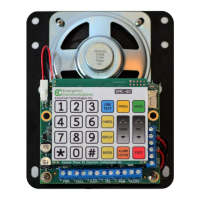
Touch <WAKE> to wake-up the keypad and illuminate the “WAKE” LED or call into the
phone from a remote location (see next section for remote programming). Touch
<PROG> to enter program mode and turn-on the “PROG” LED. The operator prompt
“program” will be heard.
Touch the key(s) to select the command number required, touch <ENTER> and listen
for the prompt to confirm the command. Input the parameters and touch <ENTER>. The
prompt “Input accepted” will be heard if the parameters qualify or “Incorrect entry,
please re-enter” if not. To check any entry, touch the command number followed by
<REPLAY>. Touch <CANCEL> to exit a command without changing the parameter.
Touch <EXIT> to leave programming mode or a timeout will occur if no entry.
REPLAY
To check the current value of any memory location, enter the command number
followed by the <REPLAY> key. For example, to hear what is stored in the primary
memory location, press the <1> key followed by <REPLAY>. One will then hear the
message “Replay…primary phone number” followed by whatever digits have been
entered into that memory location. The phone will then return to programming mode.


 To Next Page