EMC-60 User Guide
- 24 -
7 Mechanical
7.1 Dimensions
Dimensions 4.5” (114 mm) wide x 5.25” (133 mm) high x
1.75” (44 mm) deep with mounting holes to
match the common stud patterns. LED hole ¼”.
N.B. Ensure microphone holes are aligned
using the “programming reference” template.
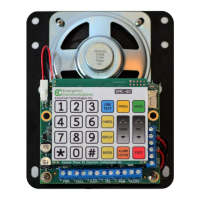
7.2 Keypad
Key Description
< * > (star) special character used in program command sequences
< # > (pause) each # represents a 2 second delay when used in phone numbers
<WAKE> wake up keypad from sleep mode (LED turns on)
<PROG> when unit is on-hook and keypad awake, initiates programming mode (LED
turns on)
<LINE TEST> when keypad awake, enables the phone to be used as a standard
speakerphone and call out (LED turns on)
<CANCEL> clears/cancels current entry AND returns to program menu
<REPLAY> plays back entry if valid command # entered
<ENTER> accepts current command or entry or ends the recording
<SPKR ↑ > increments speaker volume by one (up to 9)
<SPKR ↓ > decrements speaker volume by one (down to 1)
<MIC ↑ > increments microphone sensitivity by one (up to 9)
<MIC ↓ > decrements microphone sensitivity by one (down to 1)
<ALARM
STATUS>
plays “NORMAL” or lists active alarms
<EXIT> exits out of programming mode or ends a call
The key value/function prompt is played on the loudspeaker when a key is pressed (≠Fn37).


 To Next Page