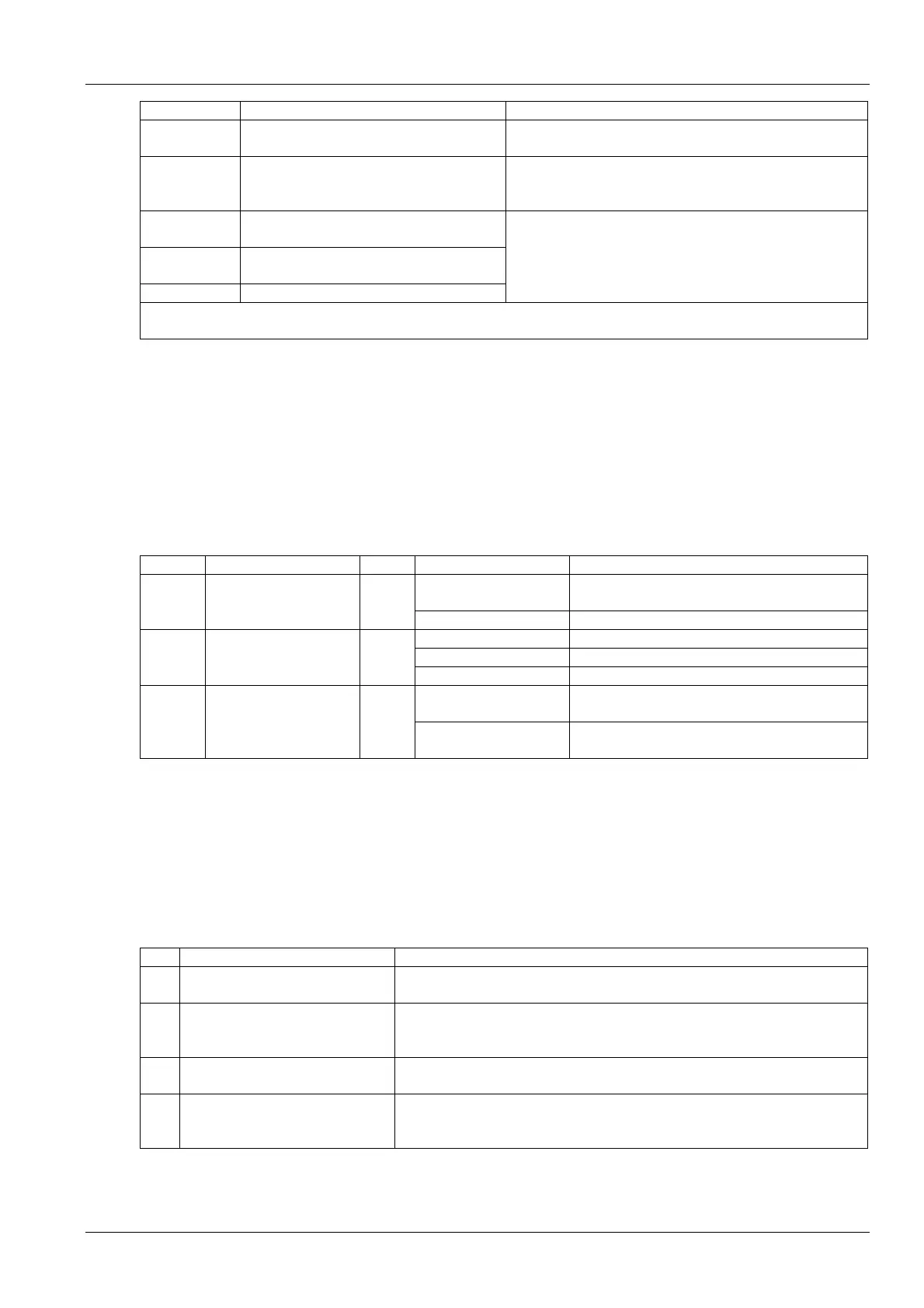
10 Chapter 3 Application Of Fan Speed Controller
Silk print Definition Definition of pins
J5 (Out Temp)
Input terminal of ambient temperature sensor
(spare)
Pin 1: input terminal of temperature signal
Pin 2: signal ground
J11 (RS232)
Serial communication interface (used for
maintenance)
Pin 1: communication ground
Pin 2: reception terminal of communication
Pin 3: transmission terminal of communication
J7 (Fan1Sta)
Detecting terminal of fan 1 over temperature
state
J10 (Fan2Sta)
Detecting terminal of fan 2 over temperature
state
J6 (CompSta) Detecting terminal of compressor state
Pin 1: output terminal of 19Vac signal
Pin 2: return terminal of 19Vac signal
Note:
J8 (SCRTemp) in Figure 3-1 is the interface of fan speed controller board, and not to be used by users
3.2 HMI
The fan speed controller operation and setup is provided through indicators, RS232 serial communication port, keys
and LCD.
Indicators
There are three indicators (see Figure 3-1) on the fan speed controller board. See Table 3-2 for the functions of
indicators.
Table 3-2 Functions of indicators
Silk print Definition Color State Function
On
The CPU circuit of fan speed controller board is
supplied with 5V power
D16 Power indicator Green
Off The fan speed controller board is faulty
On or off The fan speed controller board is faulty
Blinking at 1Hz (slowly) The system is running normally without alarm
D22 Run indicator Green
Blinking at 5Hz (quickly) There is an alarm or the compressor is shut down
On
The control switch which supplies the AC contactor
with the driving power is open
D15
Power switch controlling
indicator of AC contactor
Red
Off
The control switch which supplies the AC contactor
with the driving power is closed
RS232 serial communication port
The RS232 serial communication port is a port to connect the computer using factory-defined protocol. It is used for
factory commissioning and maintenance.
Keys and LCD
The keys and LCD, which can realize the functions in Table 3-3, provide the HMIs for maintenance personnel. Refer to
3.3 Operation Description Of HMI for operation of keys and LCD HMI.
Table 3-3 Function descriptions of keys and LCD
NO. Function Description
1
Query the acquisition data in real
time
The acquisition data include condensing pressure, ambient temperature, silicon
controlled rectifier (SCR) temperature and output percentage
2
Query the current alarm data in real
time
The current alarm data include phase loss alarm, SCR over temperature, fan 1 over
temperature, fan 2 over temperature, pressure sensor failure, EEPROM read fault
alarm, SCR temperature sensor failure and abnormal frequency
3
Query the historical alarm data in
real time
The latest saved 100 historical alarms can be queried
4
Modify the configured parameters in
real time
The configured parameters include running pressure, pressure controlling range,
minimum voltage, maximum voltage, fan number and pressure sensor type; or
resume the default values
Liebert.PEX Condenser User Manual











 To Next Page