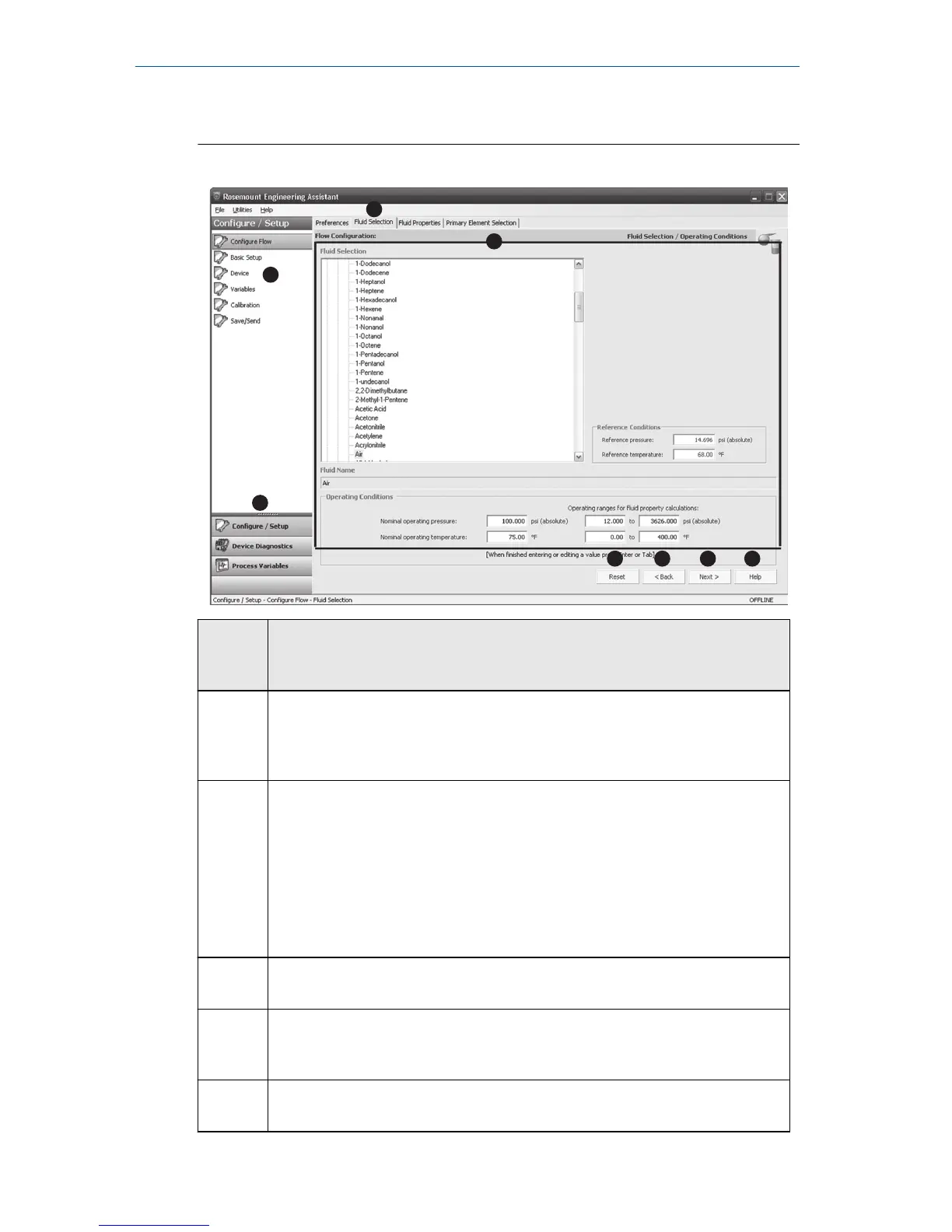
Screen
compo
nent
Description of use
A The navigation tabs contain the flow configuration information. In Offline
mode, each tab will not become active until the required fields on the
previous tab are completed. In Online mode, these tabs will be functional
at all times.
B The Reset button will return each field within all of the flow configuration
tabs (Fluid Selection, Fluid Properties, and Primary Element Selection) to
the values initially displayed at the start of the configuration.
• In Online mode, the values will return to the initial values received
from the device before the start of the configuration.
• If editing a previously saved flow configuration, the values will return
to those that were last saved. If starting a new flow configuration, all
entered values will be erased.
C The Back button is used to step backward through the flow configuration
tabs.
D The Next button is used to step forward through the flow configuration
tabs. In Offline mode, the Next button will not become active until all
required fields on the current page are completed.
E The Help button can be clicked at any time to get a detailed explanation
of the information that is required on the current configuration tab.
Quick Start Guide October 2018
18 Rosemount 3051SMV



 To Next Page
 Loading...





