Commander SK Getting Started Guide 23
Issue Number: 9 www.controltechniques.com
Safety information Rating data
Mechanical
installation
Electrical
installation
Keypad and
display
Parameters
Quick start
commissioning
Diagnostics Options
UL listing
information
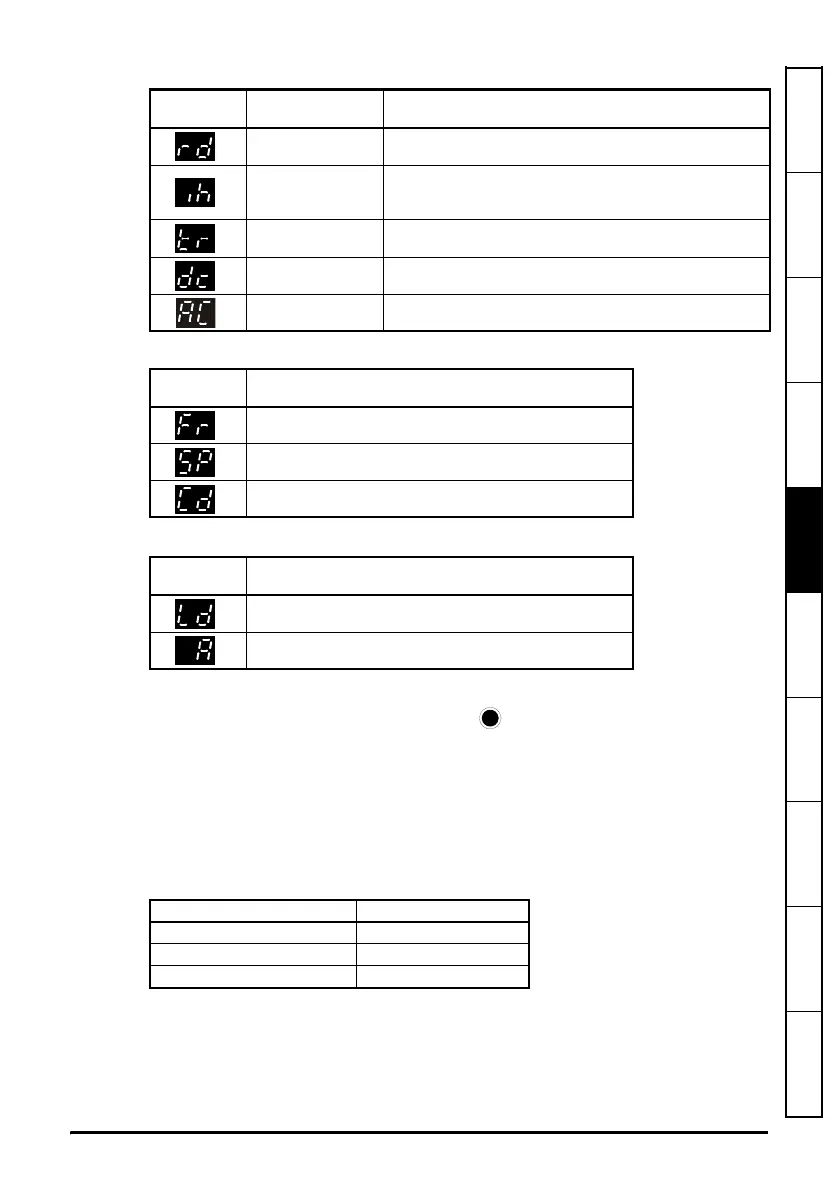
Status Modes
Speed Indications
Load indications
5.4 Saving parameters
Parameters are automatically saved when the MODE key is pressed when going
from parameter edit mode to parameter view mode.
5.5 Parameter access
There are 3 levels of parameter access controlled by Pr 10. This determines which
parameters are accessible. See Table 5-1.
The setting of the user security Pr 25 determines whether the parameter access is read
only (RO) or read write (RW).
Table 5-1
Left hand
display
Status Explanation
Drive ready
The drive is enabled and ready for a start command. The
output bridge is inactive.
Drive inhibited
The drive is inhibited because there is no enable command,
or a coast to stop is in progress or the drive is inhibited during
a trip reset.
Drive has tripped
The drive has tripped. The trip code will be displayed in the
right hand display.
DC injection braking DC injection braking current is being applied to the motor.
Mains loss See the Commander SK Advanced User Guide.
Display
Mnemonic
Explanation
Drive output frequency in Hz
Motor speed in rpm
Machine speed in customer define units
Display
Mnemonic
Explanation
Load current as a% of motor rated load current
Drive output current per phase in Amps
Parameter access (Pr 10) Parameters accessible
L1 Pr 01 to Pr 10
L2 Pr 01 to Pr 60
L3 Pr 01 to Pr 95




 To Next Page