eMKW-TD0054-21- Page 12
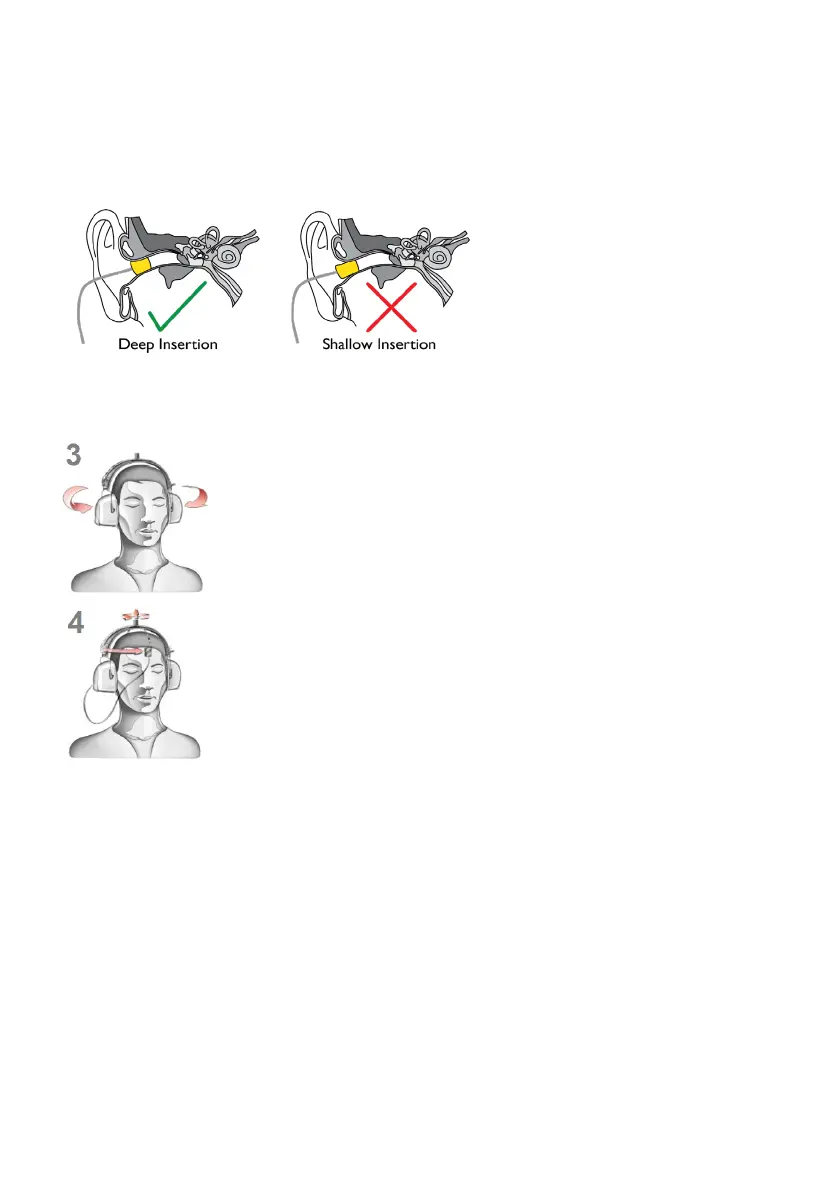
fitted ear tip or shallow insertion will result in testing inaccuracy.
Yellow eartip inserts are intended for most ear canal sizes while beige eartip inserts are intended for very
small ear canals (i.e. children).
Warning: Improper selection or insertion of eartips may affect test results.
Step 2.2: Insert Silicone Eartips
Select the correct size silicone eartip, pull
the ear pinna up and back and insert the
silicone ear tip in position. Ensure the
eartip is firmly in place and flush with the
ear canal. A loosely fitted ear tip or
shallow insertion will result in testing
inaccuracy. Silicone eartips are used only
by KUDUwave OH and ProTMP models.
Step 3: Final Position
The headset can now be lifted and placed over the patient’s ears. Ensure the ear
cups are supported by the headband and do not hang on the ears. Care must be
taken not to dislodge the ear inserts from the patient’s ear canal.
It is important to lift the left and right ear cups slightly in turn to visually confirm
the ear inserts are still correctly positioned. Make sure that the tubing is not
tangled under the cups. The tubing should loop out under the cups towards the
front of the ear to avoid tangling and or bending.
Step 4: Bone Vibrator Positioning
If the bone vibrator is to be used, the metal headband must be adjusted and
placed over the patient’s head. Ensure that it is positioned carefully on the
patient’s forehead, in line with the middle partition between the eyebrows or in
line with the centre between their eyes.
Warning: Bone vibrators are calibrated to a specific KUDUwave intended for forehead placement. They
are not interchangeable between KUDUwaves. Swapping of bone vibrators between devices may result
in inaccurate testing. If you are unsure about which bone vibrator should be used with your KUDUwave
please check its calibration certificate or alternatively contact eMoyo support.
Step 5: Patient Response Button
The Patient Response Button must be placed in the patient’s hands. Ensure that the cable does not
become tangled or damaged. The patient must keep their finger on the button and be ready to press it
when a sound is played. The patient must be told to press the button as quickly as possible and then let
go of the button.
Remote Testing
The KUDUwave can easily and safely be used for remote testing over internet connections.



 To Next Page