ACTION WHAT TO DO WHAT YOU SEE NOTES
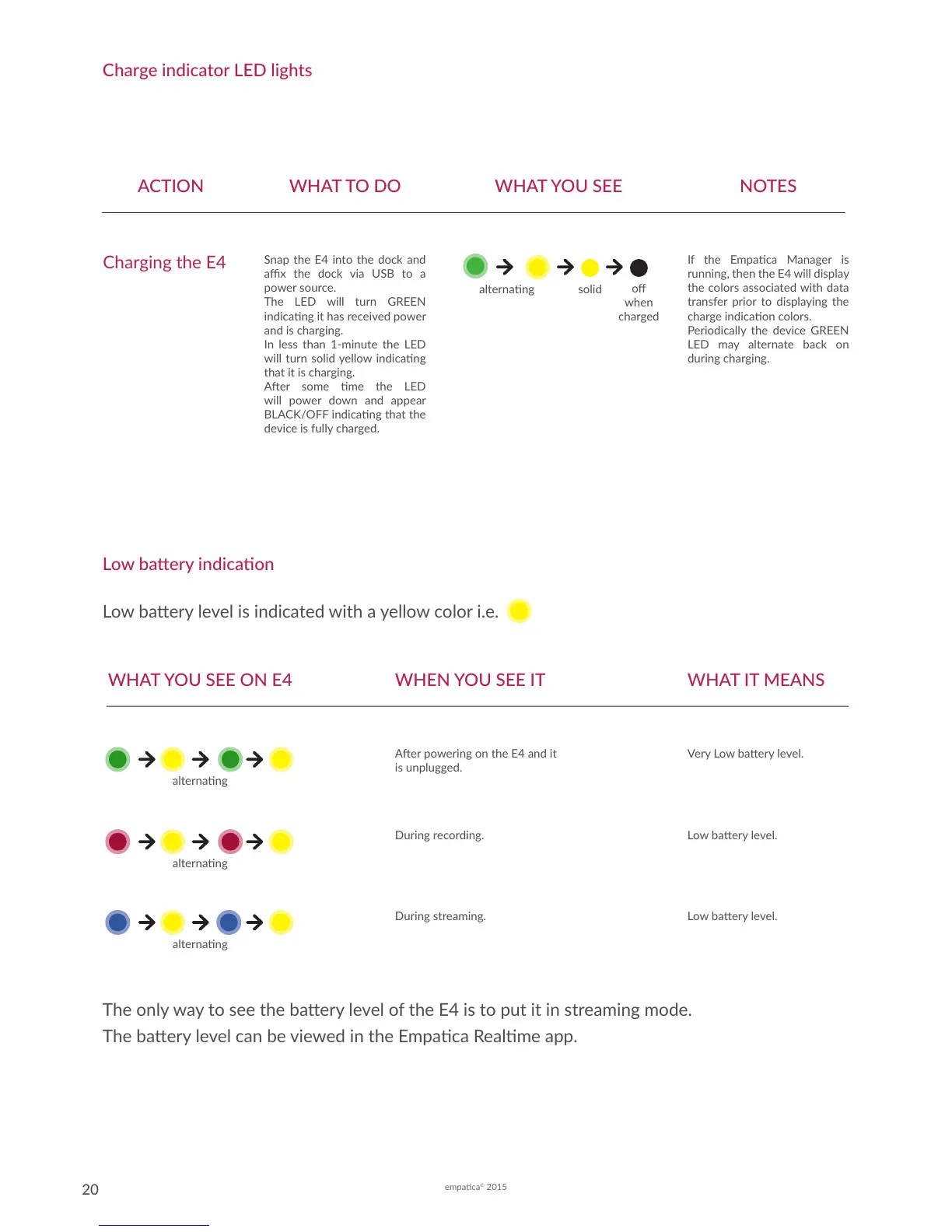
Charging the E4
Snap the E4 into the dock and
ax the dock via USB to a
power source.
The LED will turn GREEN
indicang it has received power
and is charging.
In less than 1-minute the LED
will turn solid yellow indicang
that it is charging.
Aer some me the LED
will power down and appear
BLACK/OFF indicang that the
device is fully charged.
If the Empaca Manager is
running, then the E4 will display
the colors associated with data
transfer prior to displaying the
charge indicaon colors.
Periodically the device GREEN
LED may alternate back on
during charging.
alternang solid
o
when
charged
Charge indicator LED lights
Low baery indicaon
Low baery level is indicated with a yellow color i.e.
The only way to see the baery level of the E4 is to put it in streaming mode.
The baery level can be viewed in the Empaca Realme app.
WHAT IT MEANSWHEN YOU SEE IT
Aer powering on the E4 and it
is unplugged.
During recording.
During streaming.
Very Low baery level.
Low baery level.
Low baery level.
WHAT YOU SEE ON E4
alternang
alternang
alternang



 To Next Page