Start recording with the E4 wristband:
Working in recording mode
For easy everyday use of the E4 you can record data on the go and sync it once a day.
Recording mode allows you to record data and analyze it later.
Download Empaca Manager from hps://www.empaca.com/product-e4-download and follow the
installaon instrucons.
Once installed, use Empaca Manager to synchronize your session data to Empaca Connect, set
the E4’s clock and manage device rmware.
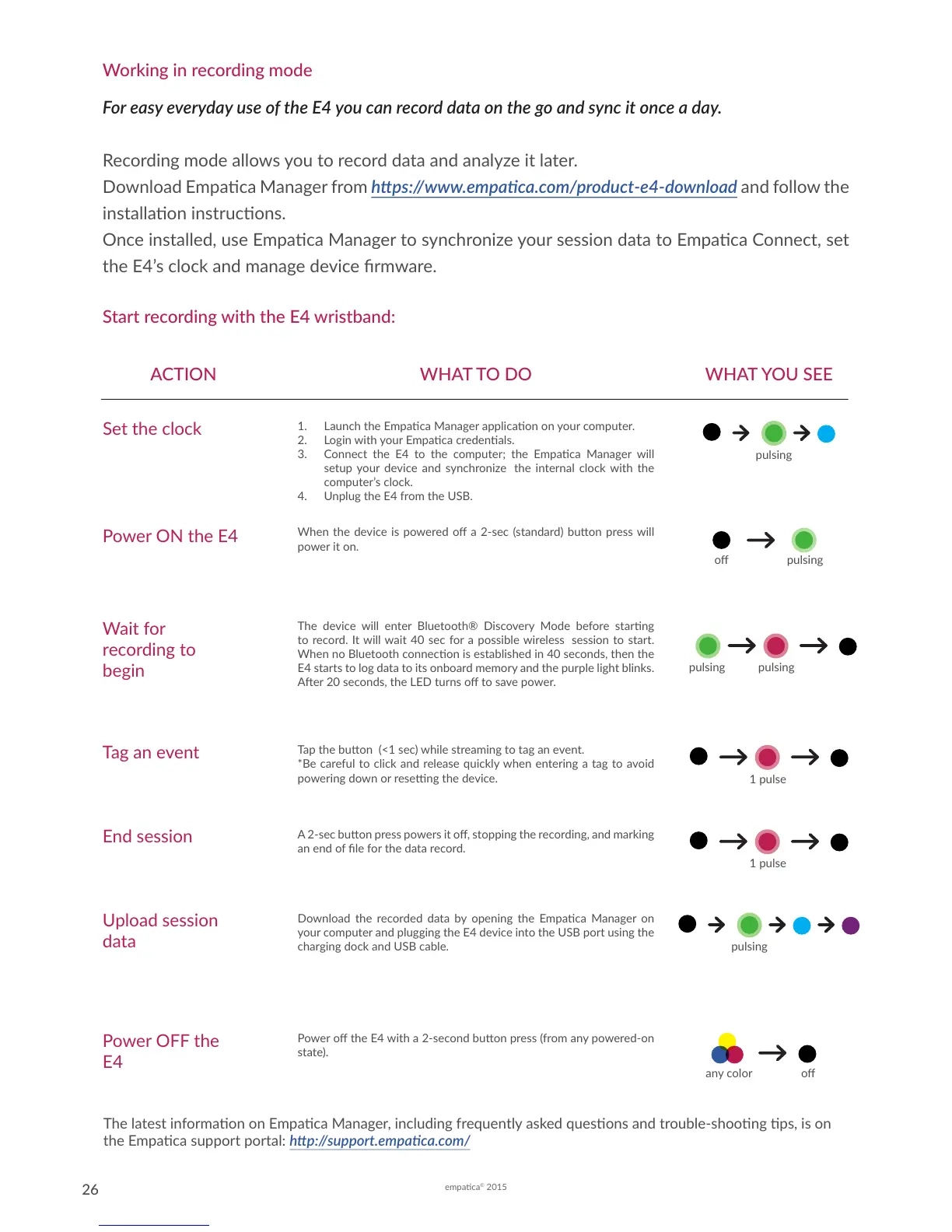
ACTION WHAT TO DO WHAT YOU SEE
Set the clock
1. Launch the Empaca Manager applicaon on your computer.
2. Login with your Empaca credenals.
3. Connect the E4 to the computer; the Empaca Manager will
setup your device and synchronize the internal clock with the
computer’s clock.
4. Unplug the E4 from the USB.
Wait for
recording to
begin
The device will enter Bluetooth® Discovery Mode before starng
to record. It will wait 40 sec for a possible wireless session to start.
When no Bluetooth connecon is established in 40 seconds, then the
E4 starts to log data to its onboard memory and the purple light blinks.
Aer 20 seconds, the LED turns o to save power.
o pulsing
Tap the buon (<1 sec) while streaming to tag an event.
*Be careful to click and release quickly when entering a tag to avoid
powering down or reseng the device.
A 2-sec buon press powers it o, stopping the recording, and marking
an end of le for the data record.
Download the recorded data by opening the Empaca Manager on
your computer and plugging the E4 device into the USB port using the
charging dock and USB cable.
Tag an event
End session
Upload session
data
The latest informaon on Empaca Manager, including frequently asked quesons and trouble-shoong ps, is on
the Empaca support portal: hp://support.empaca.com/
Power ON the E4
When the device is powered o a 2-sec (standard) buon press will
power it on.
pulsing pulsing
1 pulse
1 pulse
pulsing
pulsing
Power o the E4 with a 2-second buon press (from any powered-on
state).
Power OFF the
E4
oany color


 To Next Page