EL – Owner’s Manual – Rev.00 – September 2021 29
CONTROL, FUNCTIONS AND SYSTEM STATES OF THE
ELECTROLYSER
Before powering on the device, ensure the power cable and all pipes are properly connected and
secured as described in this manual. Then, switch the breaker to the upper position.
Manual Start/Stop
When the device is in standby mode, push the start/stop button, this will start the device. Remember
that it may take some minutes to warm up, purging the humidity and ramping up before hydrogen
flows out of the H
2
outlet.
To stop the device, simply push the start/stop button again. The device then ramps down and purges
the contained H
2
to return itself to a safe state.
Warning!
Do not unplug/disconnect the power to the device without either manually
or via software control shutting it down safely first. Unexpected power cuts
can shorten the device’s lifetime and damage it!
Remote Start/Stop
The device can be started/stopped remotely using the Enapter app or cloud as well as remotely via
the Modbus interface. For more information on this, please refer to the online Enapter handbook.
Maintenance Mode
Maintenance mode can be manually enabled using the Enapter App. It is used to safely fill and drain
the device, as well as to guide you through inspection and other routine maintenance tasks. Please
see the chapter Maintenance of the Electrolyser to know more.
Set Production Rate
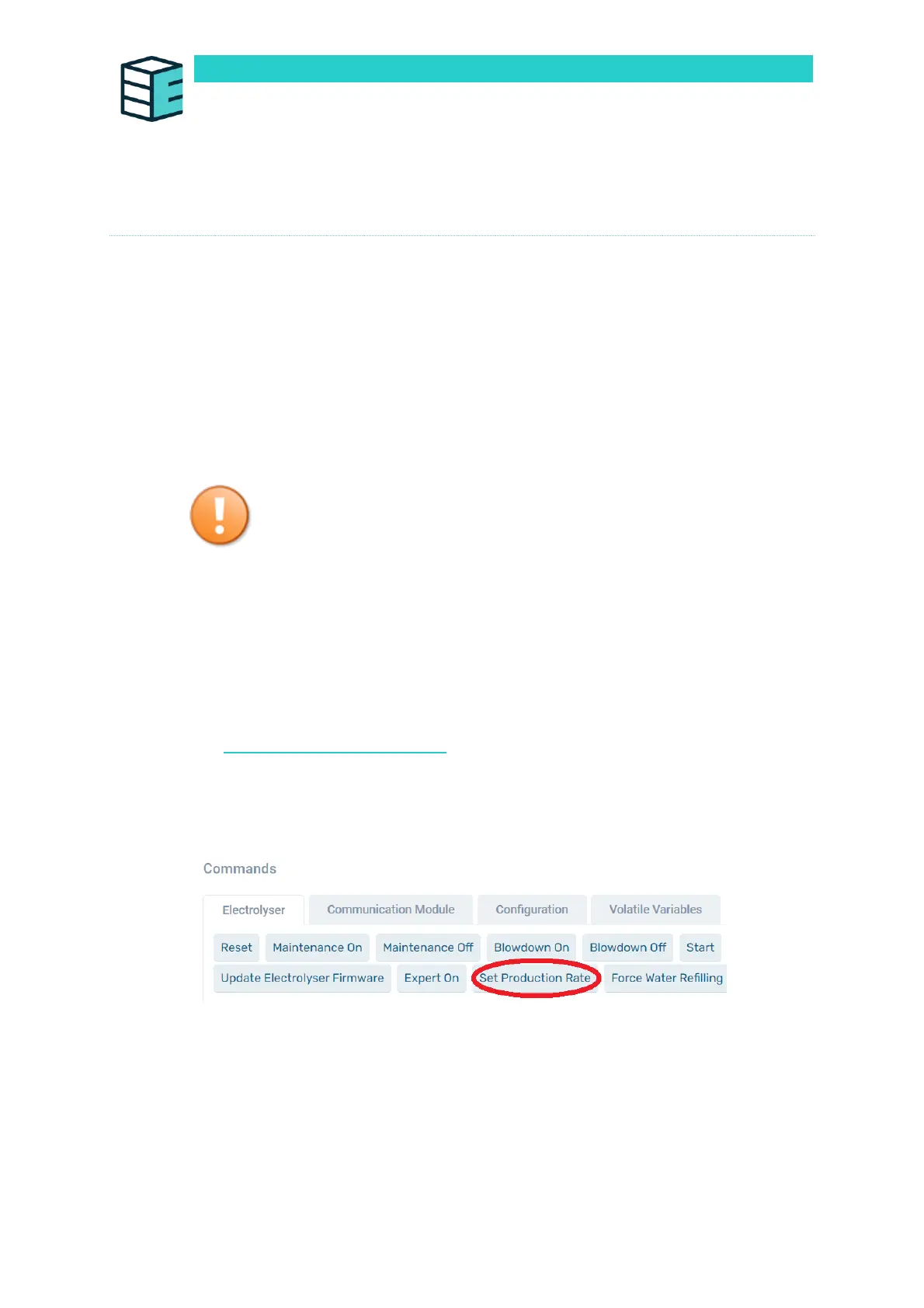
Setting the production rate on the Cloud can be done in a very simple way on the main page of the
electrolyser. On the "Commands" section click on the button "Set Production rate".
Enter a number between 60 and 100 to set the production rate to a desired percentage (60%-100%).
Then click on the button "Create Command". The production can be adapted in 1% steps.


 To Next Page