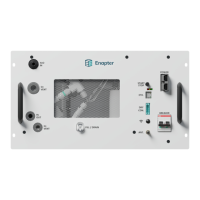
10. DRY CON. – please refer to the Dry Contact Connection Guide
Interface to connect device to external sensors for emergency stops
11. WiFi Button – please refer to the Pairing the device to the cloud section below
Manual button to activate/deactivate WiFi
12. ANT. – Antenna port SMA male
The device can be connected to the local network via Bluetooth and Wi-Fi, enabling
real-time updates and monitoring for the operator via the Enapter App and cloud. A
miniature antenna can be attached to this port to increase the amplification.
Do not touch the port when the device is powered on!
13. On/Off Button (only in AC version) or Breaker (only in DC version) – please refer to the Electrical
Connection Guide
Integrated magnetothermal circuit breaker to protect the electrolyser from
overcurrent and short-circuits.
14. Fuses (only in AC version) or Breaker (only in DC version) – please refer to the Electrical
Connection Guide
Integrated magnetothermal circuit breaker to protect the electrolyser from
overcurrent and short-circuits.
15. Handle Bars – please refer to the Transport section below
For easier transportation
16. Air Inlets – please refer to the Routine Maintenance
Keep the air inlets free from dust and dirt
17. LEDs – please refer to the Appendix IV
Status LEDs to show device status


 To Next Page