QUICK SET UP GUIDE
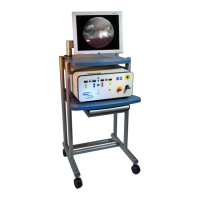
Color Video Monitor
Turn monitor ON by depressing power button lower right
Back of E2 Unit
Start with Laser Key in the OFF Position (O) top center
Turn Power ON (1) above power cord
Laser Key to ON Position (1)
E2 Front Control Panel
Connect Three Probe Ends to Front Panel (save caps)
Laser - Screw on - top right
Light - Plug in - lower center
Video Connection - Firm Plug in - lower right
Laser Power (yellow) - set to .25 watts
Laser Duration (blue) - set to Continuous
Increase Illumination (white) - only partially
Focus Image - knurled ring around video connection.
Press Enable Button (green) - indicator light comes on
Increase Aiming Beam (red) - red light in field
x When the surgeon is ready to use microendoscope, light and aiming beam may
need to be adjusted.
x Laser power may be adjusted intraoperatively while pedal is not depressed.
x Red emergency stop button must be in the out (off) position for laser to operate.
x ONLY sodium hyaluronate viscoelastics may be instilled when laser is to be applied.
x If image becomes blurred during surgery, clean probe tip with Merocel
®
Instrument Wipe or Spear.
x Before disconnecting microendoscope, clean probe tip with concentrated alcohol
and then rinse. Check image clarity before turning off unit.
CAUTION: The heat generated by the light source varies and can be hot
causing the light connector, on the endoscope, to become hot. To prevent
injury to the operator the light intensity should be turned down so the
connector can cool before removing it from the system.


 To Previous Page