62
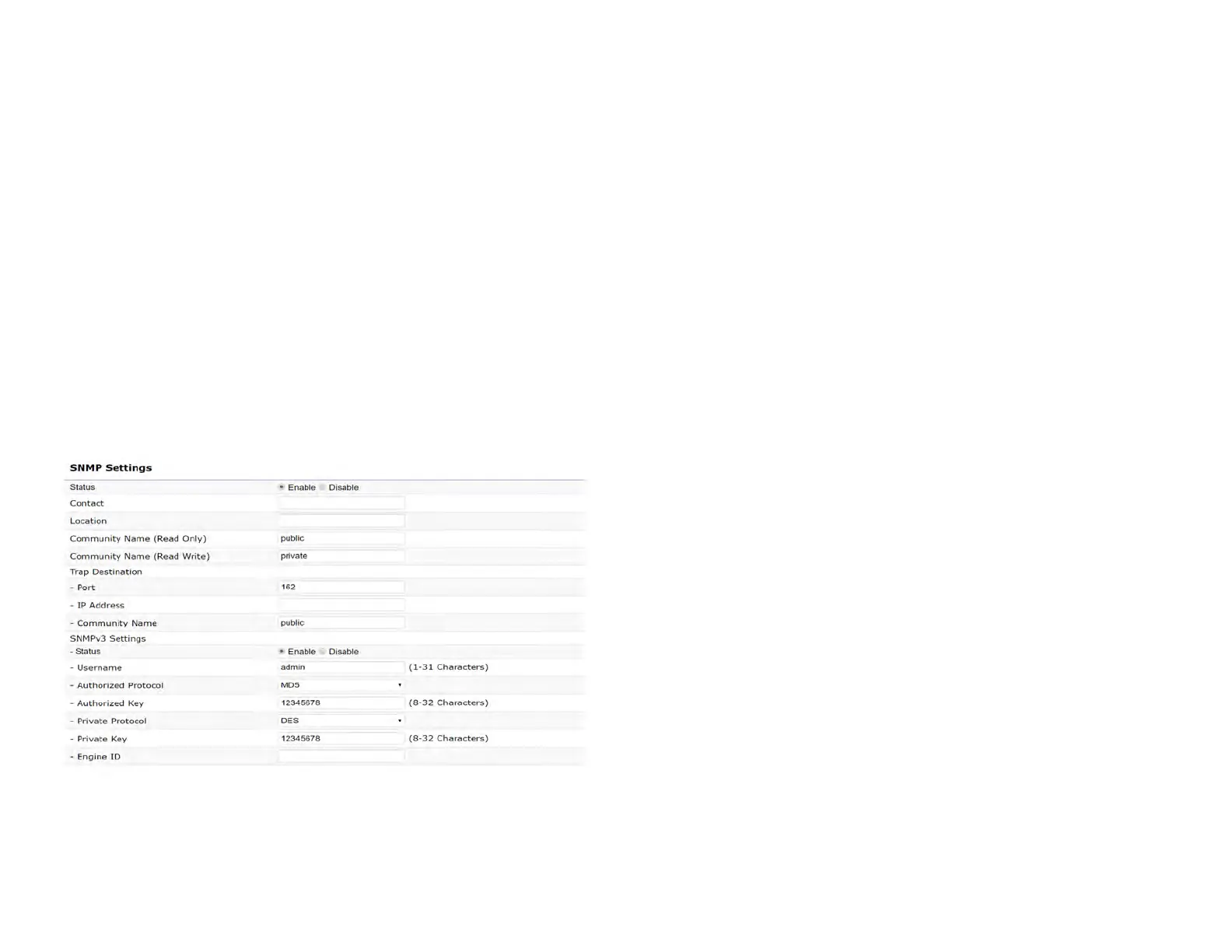
SNMP Settings
This page allows you to assign the Contact Details, Location,
Community Name, and Trap Settings for a Simple Network
Management Protocol (SNMP). SNMP is a networking
management protocol used to monitor network attached
devices. SNMP allows messages (called protocol data units)
to be sent to various parts of the network. Upon receiving
these messages, SNMP compatible devices (called agents)
returns the data stored in their Management Information
Bases.
SNMP Enable/Disable: Enables or disables the SNMP
feature.
Contact: Species the contact details of the device.
Location: Species the location of the device.
Community Name (Read Only): Species the password
for the SNMP community for read only access.
Community Name (Read/Write): Species the password
for the SNMP community with read/write access.
Trap Destination Address: Species the IP address of the
computer that will receive the SNMP traps.
Trap Destination Community Name: Species the
password for the SNMP trap community.
SNMPv3: Enables or disables the SNMPv3 feature.
User Name: Species the username for SNMPv3.
Auth Protocol: Selects the authentication protocol type:
MDS or SHA.
Auth Key: Species the authentication key.
Priv Protocol: Selects the privacy protocol type: DES.
Priv Key: Species the privacy key for privacy.
Engine ID: Species the engine ID for SNMPv3.
Apply Save: Click Apply Save to apply the changes.
Advanced Settings



 To Next Page