50
2.4 GHz/5 GHz SSID Prole
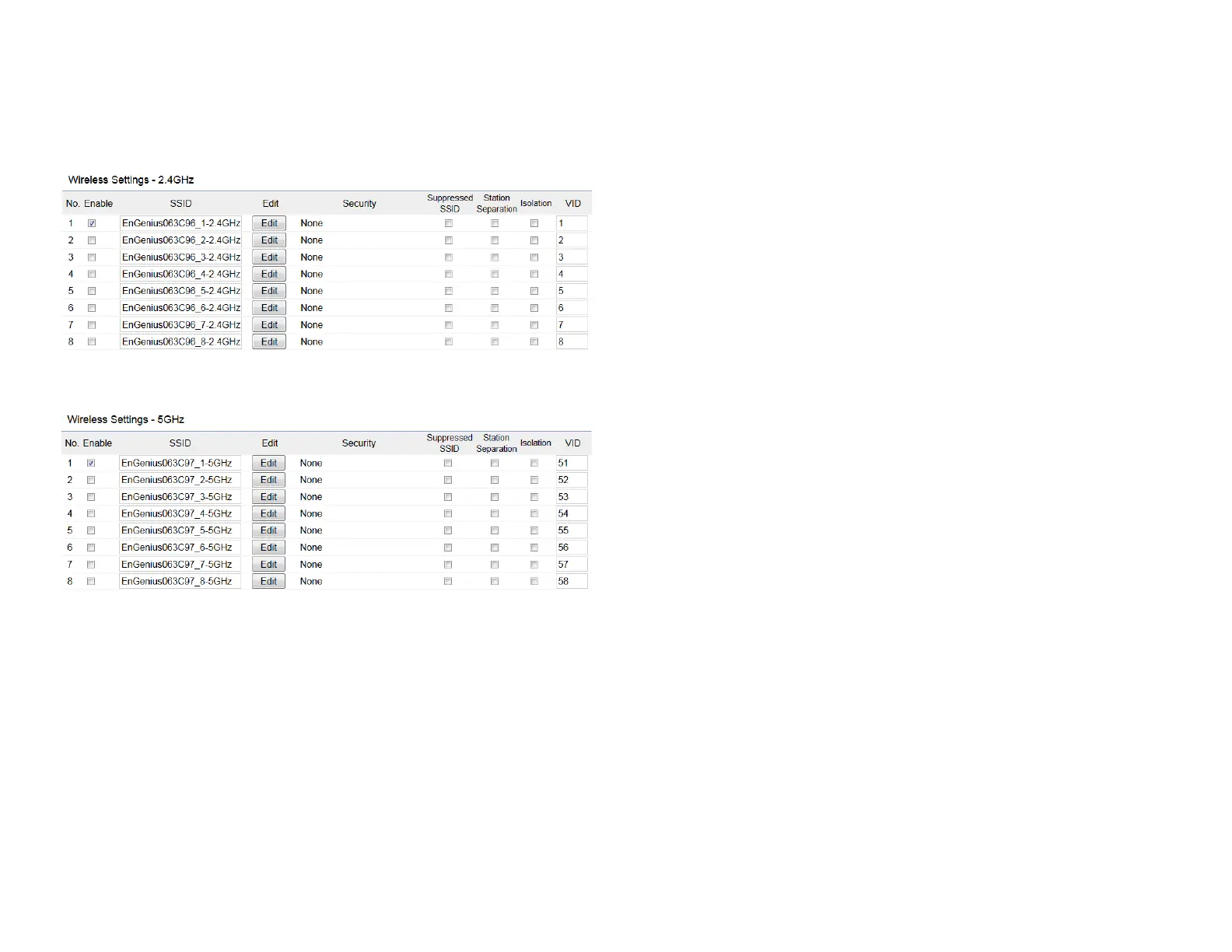
Current Prole: You can congure up to sixteen (16)
different SSIDs (eight (8) per band). If multiple client
deviceswillbeaccessingthenetwork,youcanarrangethe
devices into SSID groups. Click Edittoconguretheprole
andcheckwhetheryouwanttoenableextraSSID.
Enable: ClickthischeckboxtoenablethisSSIDinterface.
ThedefaultSSIDsareenableonthebothrst2.4GHzand
5GHz SSID.
SSID:
SpeciestheSSIDforthecurrentprole.
Hidden SSID: Check this option to hide the SSID from clients.
Ifchecked,theSSIDwillnotappearinthesitesurvey.
Client Isolation: Click the appropriate radio button to enable
this function for allowing or preventing communication
between client devices.
VID:
SpeciestheVLANtagforeachprole.Ifyournetowrk
includesVLANs,youcanspecifyaVLANIDforpacketspass
through the Access Point with a tag.
Wireless Security: See the Wireless Security section.
VLAN Isolation: Restrict clients communicating with
different VIDs by selecting the radio button.
L2 Isolation: Enable this function prevenet client devices
to communicate on the both WLAN and LAN.
Save: Click Save to accept the changes.













 To Next Page