30
Key Length: You can select the WEP key length for encryption, 64-bit or 128-bit.
The larger the key will be the higher level of security is used, but the throughput
will be lower.
Key Type: You may select ASCII Characters (alphanumeric format) or
Hexadecimal Digits (in the "A-F", "a-f" and "0-9" range) to be the WEP Key.
Default Key: It’s the key used to encrypt data.
Key1 - Key4: The WEP keys are used to encrypt data transmitted in the
wireless network. Use the following rules to setup a WEP key on the device.
64-bit WEP:
input 10-digits Hex values (in the "A-F", "a-f" and "0-9" range) or 5-
digit ASCII character as the encryption keys.
128-bit WEP:
input 26-digit Hex values (in the "A-F", "a-f" and "0-9" range) or 13-
digit ASCII characters as the encryption keys.
Click <Apply> at the bottom of the screen to save the above configurations.
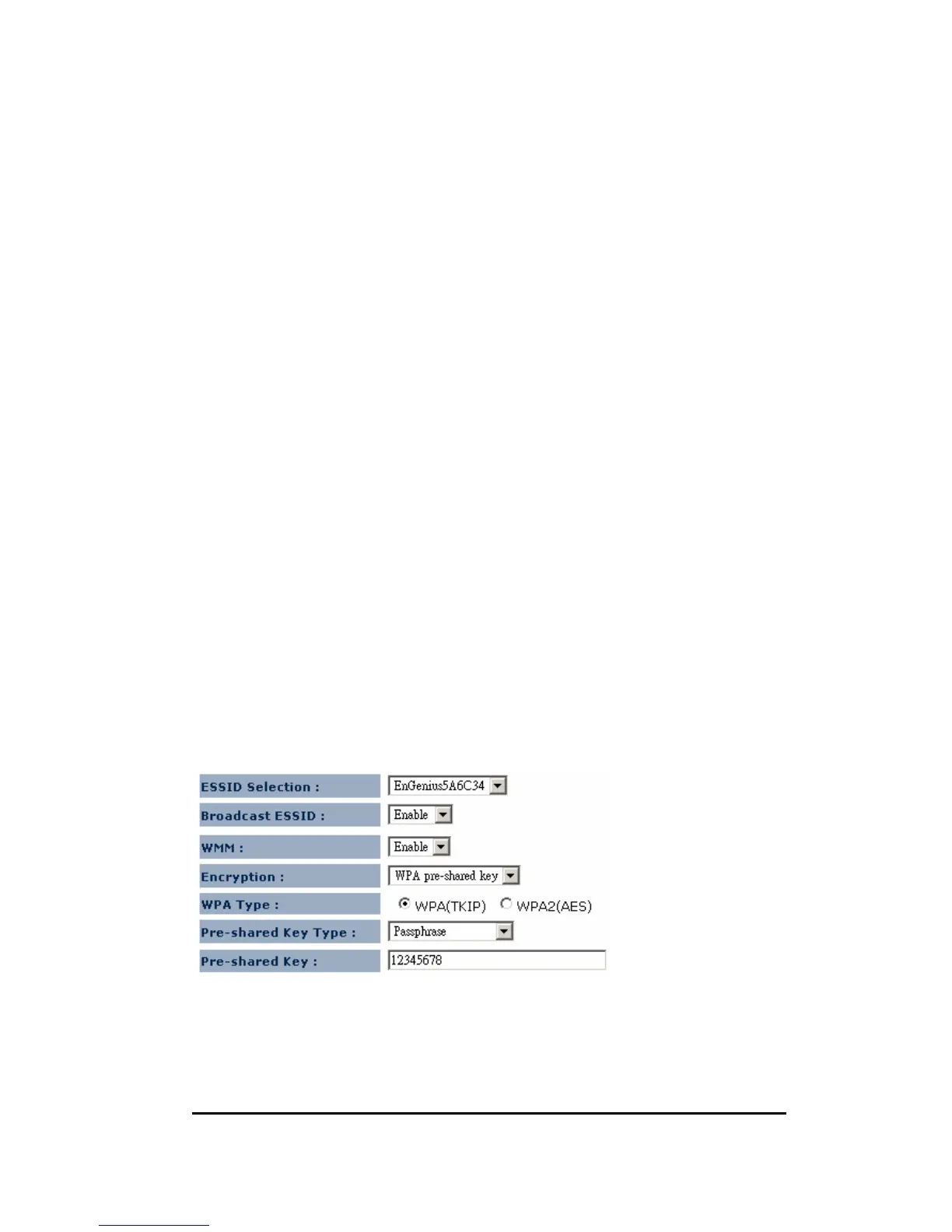
8.4.2. WPA Pre-Shared Key Encryption
Wi-Fi Protected Access (WPA) is an advanced security standard. You can use a
pre-shared key to authenticate wireless stations and encrypt data during
communication. It uses TKIP or CCMP (AES) to change the encryption key


 To Next Page