38
Click <Apply> at the bottom of the screen to save the above configurations.
10.5. IP Filter
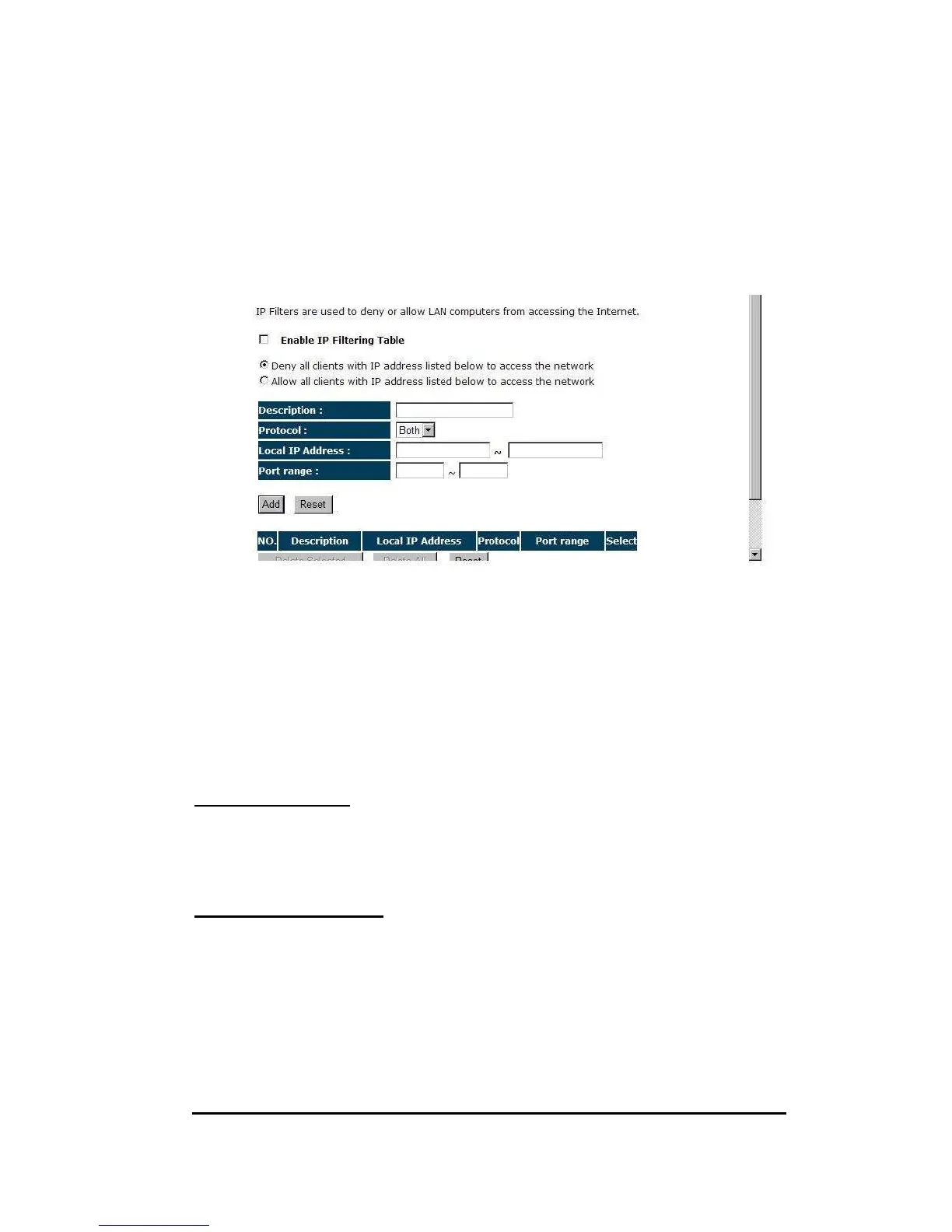
Enable IP Filtering: Check to enable or uncheck to disable IP Filtering.
Deny: If you select “Deny” then all clients will be allowed to access Internet except
for the clients in the list below.
Allow: If you select “Allow” then all clients will be denied to access Internet except
for the PCs in the list below.
Add PC IP Address
You can click <Add> PC to add an access control rule for users by an IP address or
IP address range.
Remove PC IP Address
If you want to remove some PC IP from the <IP Filtering Table>,
select the PC you want to remove in the table and then click <Delete Selected>. If
you want to remove all PCs from the table, just click the <Delete All> button.
Click <Apply> at the bottom of the screen to save the above configurations.


 To Next Page