27
8.3. Advanced
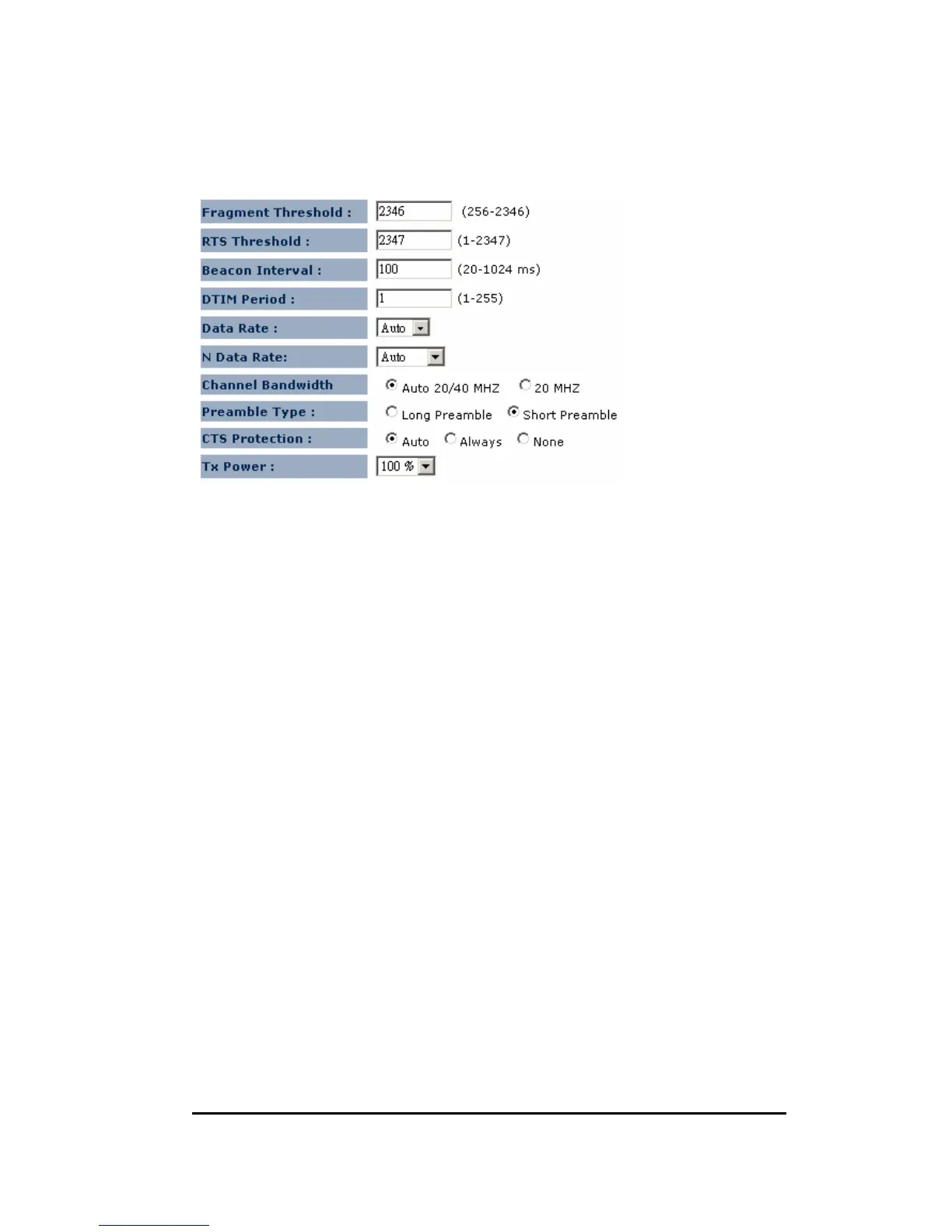
Fragment Threshold: This specifies the maximum size of a packet during the
fragmentation of data to be transmitted. If you set this
value too low, it will result in bad performance.
RTS Threshold: When the packet size is smaller than the RTS threshold, the
wireless router will not use the RTS/CTS mechanism to send
this packet.
Beacon Interval: This is the interval of time that this wireless router broadcasts
a beacon. A Beacon is used to synchronize the wireless
network.
DTIM Period: Enter a value between 1 and 255 for the Delivery Traffic Indication
Message (DTIM). A DTIM is a countdown informing clients of the
next window for listening to broadcast and multicast messages.
Data Rate: The “Data Rate” is the rate that this access point uses to transmit
data packets. The access point will use the highest possible
selected transmission rate to transmit the data packets.


 To Next Page