44
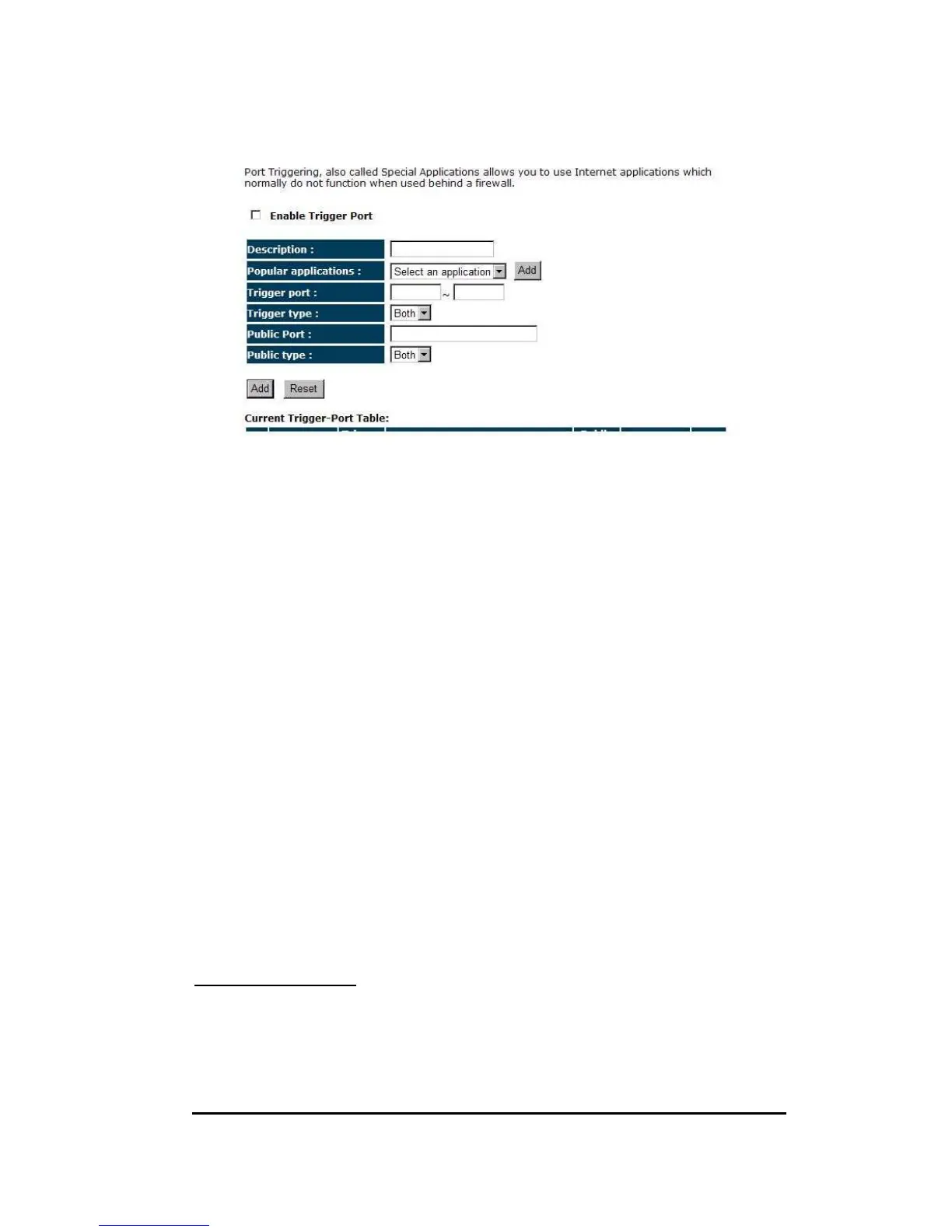
Enable Trigger Port: Enable or disable the Port Trigger function.
Trigger Port: This is the outgoing (Outbound) range of port numbers for this
particular application.
Trigger Type: Select whether the outbound port protocol is “TCP”, “UDP” or “BOTH”.
Public Port: Enter the In-coming (Inbound) port or port range for this type of
application (e.g. 2300-2400, 47624)
Public Type: Select the Inbound port protocol type: “TCP”, “UDP” or “BOTH”
Popular Applications: This section lists the more popular applications that require
multiple connections. Select an application from the Popular Applications selection.
Once you have selected an application, select a location (1-5) in the “Add” selection
box and then click the <Add> button. This will automatically list the Public Ports
required for this popular application in the location (1-5) you specified.
Add Port Triggering
Fill in the "Trigger Port", "Trigger Type”, “Public Port”, "Public Type", "Public
Port" and "Description" of the setting to be added and then Click <Add>. The Port


 To Next Page