page 10
4. UDP/RTP–TheseIPstream“Channels”requireanIPaddress
andportinformationinordertotunetotheI/Pstreamchan-
nelyoudesiretoview.
Note:
Dependingontheselectiontype,themenuoptionswillchangefor
theChannelListmenu
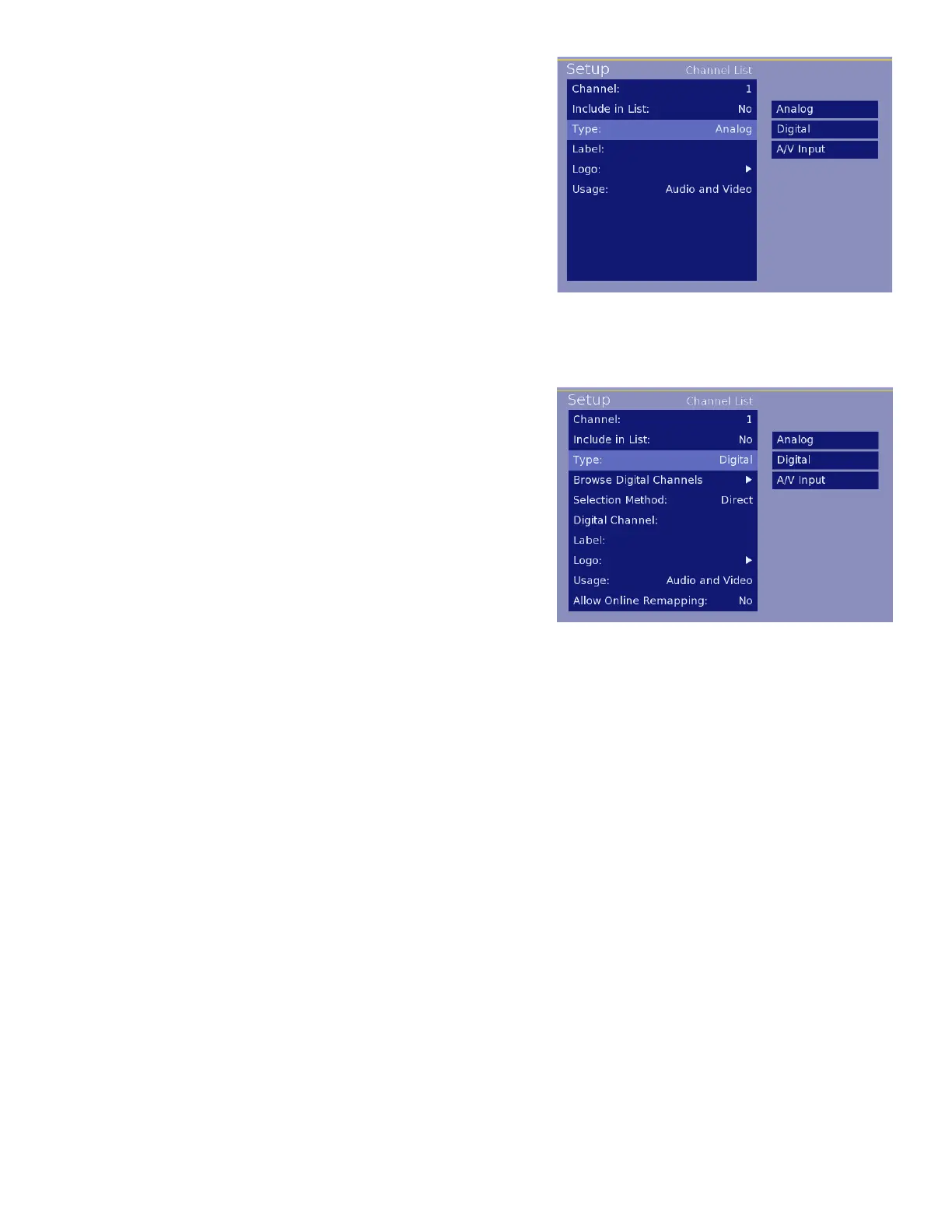
Analog Type Selection:
TheoptionsforananalogchannelincludeacustomizedLabelfor
thechannel,additionofathumbnaillogoforthechannelandse-
lectionofaudio/videooptionsforthechannel.
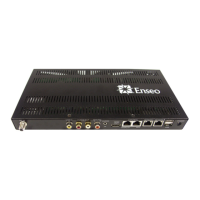
Digital Type Selection:
1. Browse Digital Channels-Availableforscanningthrough
digitalchannelsaftertheyhavebeenscannedusingtheDigital
ChannelSearchfunctionfromtheChannelOptionsMenu.
Note: To browse the digital channels, a standard Sony
TV remote, with CH+/CH- buttons is required. The
remotes provided with the FWD and KLH model dis-
plays do not include CH+ / CH- buttons and cannot
browse the scanned digital channels. Also note that
the encrypted channels will display a blank screen until
actuallyplacedinthechannelring.
2. Selection Method-Digitalstreamsmaycontaininformation
thatallowforthecreationofvirtualchannels.Forexample,
stationWXYZmaytransmitonchannel14.1,butincludeinfor-
mationthatdescribesthechannelas8.1.Thisisdoneinsituationswherenamebrandinghasoccurredandthe
stationstillwantstobeidentifiedwithitsoldallocation.
In the example above, 14.1 is the direct channel and 8.1 is the virtual channel. The Enseo unit is able to
captureandinterpretthesevirtualchannels.Whensettingupyourchannelring,youmaychoosebetweenthe
virtualchannelIDortheactualchannelinformation.
3. Digital Channel-ThissectionprovidesfortheentryoftheChannelPrimarydigitsandSub(Program)digitsfor
theknowndigitalchannel
4. Label-EntryusingUP/DOWNarrowbuttonstoenteratextlabelforthechannel
Note:PPVsystemsmaynotusethelabelsettingintheHD2000RFandinsteaduseownlabelmethod.Confirm
withyourPPVprovideriflabelinformationwillbeused.
Image 6 – Digital Channel Options
Image 5 – Analog Channel Settings


 To Next Page