REV. 10/2021
6B
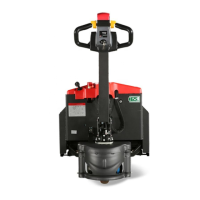
1.2.2 Control handle
11 Key switch Connect and interrupt control current.
12 Fault indicating lamp Shows the error state of the truck( see the chapter error code)
13 Horn button Send out sound warning signals.
14 Lift button
Raises the load device. When the battery is
consumed about 85%, lifting function will be locked.
15 Lower button Lowers the load device.
16 Drive switch Controls travel direction and speed
17 Creep speed switch
If the control lever is set to the brake zone(B), and press
creep speed switch and drive switch at the same time, then the
vehicle will move at a low speed.
18
Emergency reverse
switch
By pressing this switch, the vehicle starts to travel in the
opposite direction.
18
Fig1154-00005OM


 To Next Page