EasyManua.ls Logo

Epever XTRA3210N - User Manual

Epever XTRA3210N
60 pages
Print Icon
To Next Page IconTo Next Page
Loading...
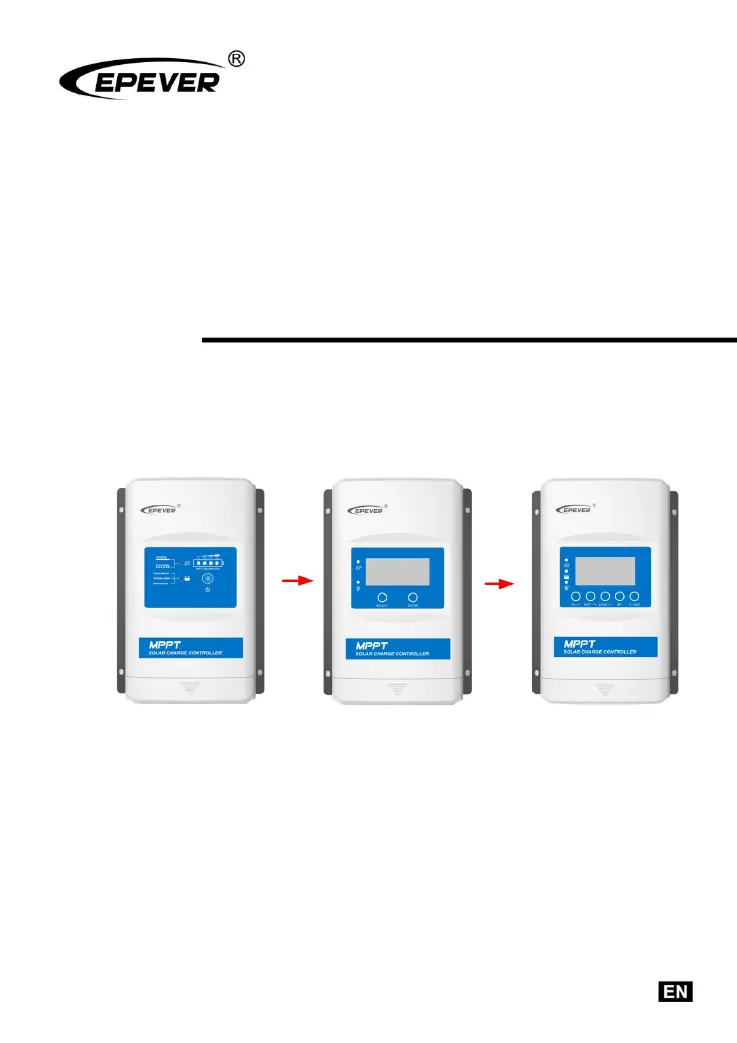
MPPT Solar Charge Controller
User Manual
Models:
XTRA1206N/XTRA2206N
XTRA1210N/XTRA2210N
XTRA3210N/XTRA4210N
XTRA3215N/XTRA4215N
XTRA3415N/XTRA4415N

Questions and Answers

  • S
    shawntaylorSep 18, 2025
    What does it mean when the PV/BATT(orange)/Battery capacity level indicator is fast flashing on my Epever Controller?
    • S
      Sean KingSep 18, 2025
      A fast flashing PV/BATT(orange)/Battery capacity level indicator on your Epever Controller signifies that the controller is overheating. The controller will automatically cut off input and output circuits when the heat sink temperature exceeds 85°C. It will resume working when the temperature drops below 75°C.
  • P
    Pedro ObrienAug 25, 2025
    How to fix the charging LED indicator off during daytime when sunshine falls on PV modules properly on my Epever XTRA3210N Controller?
    • M
      Mark PattersonAug 25, 2025
      If the charging LED indicator is off during the daytime when sunshine falls on PV modules properly, confirm that the PV wire connections are correct and tight.
  • B
    Benjamin GomezAug 25, 2025
    What to do if my Epever XTRA3210N Controller shows Load Overload?
    • P
      Paul GarnerAug 26, 2025
      If your Epever Controller indicates a Load Overload, try reducing the number of connected electrical devices. Then, restart the controller and wait for a complete night-day cycle (with nighttime lasting more than 3 hours).
  • M
    Mary WilcoxAug 27, 2025
    What to do if my Epever XTRA3210N indicates a Load Short Circuit?
    • D
      Danielle BradleyAug 27, 2025
      If your Epever Controller displays a Load Short Circuit error, carefully inspect the load connections and fix any faults. After correcting the issue, restart the controller and allow it to cycle through one complete night-day period (with nighttime exceeding 3 hours).
  • H
    hunter19Sep 18, 2025
    Why is the charging indicator on my Epever Controller flashing green rapidly?
    • A
      Alan MendozaSep 18, 2025
      A rapidly flashing green charging indicator on your Epever Controller indicates a battery over voltage. Check if the battery voltage is higher than the over voltage disconnect voltage (OVD) and disconnect the PV.
  • L
    lisachoiSep 23, 2025
    Why is my Epever XTRA3210N not working even though the wire connections are correct?
    • D
      Dustin OwensSep 23, 2025
      If your Epever Controller is not working despite correct wiring, the battery voltage may be too low (lower than 8V). Check the battery voltage and ensure it is at least 8V to activate the controller.
  • M
    Melissa SandersSep 9, 2025
    What happens if my Epever XTRA3210N experiences battery overvoltage?
    • K
      Kyle PerezSep 9, 2025
      When the battery voltage reaches the over-voltage disconnect voltage on the Epever Controller, the battery charging will automatically stop. This prevents damage to the battery that could be caused by over-charging.
  • P
    Pamela OneillSep 10, 2025
    What happens if my Epever XTRA3210N's lithium battery gets too cold?
    • R
      Rhonda CurtisSep 10, 2025
      If the temperature detected by the optional temperature sensor is below the low temperature threshold (LTPT) on your Epever Controller, the controller will automatically stop charging and discharging.
  • H
    Harry HillSep 3, 2025
    What does it mean when the charging indicator is green fast flashing on my Epever XTRA3210N Controller?
    • S
      Sierra HooperSep 3, 2025
      If the charging indicator on your Epever Controller is flashing green rapidly, it signifies a battery over voltage. Check if the battery voltage is higher than OVD (over voltage disconnect voltage), and disconnect the PV.
  • T
    Taylor HubbardSep 1, 2025
    What to do if the load has no output on my Epever XTRA3210N Controller?
    • J
      johnsonjoelSep 1, 2025
      If the load has no output on your Epever Controller, it's likely due to a load overload. Reduce the number of electrical devices connected and restart the controller.

Summary

Important Safety Instructions

General Safety Information

Provides general safety guidelines before installation and operation of the controller.

Installation

Installation Attentions

Highlights crucial precautions and warnings before proceeding with installation.

PV Array Requirements

Specifies requirements and considerations for connecting the PV array to the controller.

Wire Sizing and Selection

Provides guidelines for selecting appropriate PV and battery/load wire sizes.

System Wiring and Grounding

Details system wiring, schematic diagrams, and grounding requirements.

Parameters Setting

Battery Parameters

Covers supported battery types, local, and remote setting options.

Load Working Modes

Explains different load working modes and their LCD settings.

Others

Protection Mechanisms

Details various protection mechanisms of the controller against electrical faults.

Troubleshooting Guide

Provides a guide to diagnose and resolve common issues with the controller.

Technical Specifications

Epever XTRA3210N Specifications

General IconGeneral
ModelXTRA3210N
Rated Voltage12V/24V Auto
Rated Charge Current30A
Rated Load Current20A
Max PV Input Voltage100V
Max PV Input Power (12V)390W
Max PV Input Power (24V)780W
Efficiency≤98%
Self-consumption≤ 10mA
Charge Circuit Voltage Drop≤0.26V
Discharge Circuit Voltage Drop≤0.15V
Altitude≤ 2000m
CoolingNatural Cooling
Weight1.2kg
TypeSolar Charge Controller
Temperature Compensation-3mV/°C/2V (Default)
CommunicationRS485
Battery typeSealed, Gel, Flooded, Lithium
GroundingNegative
ProtectionOverload, Short Circuit, Reverse Polarity

Related product manuals