15
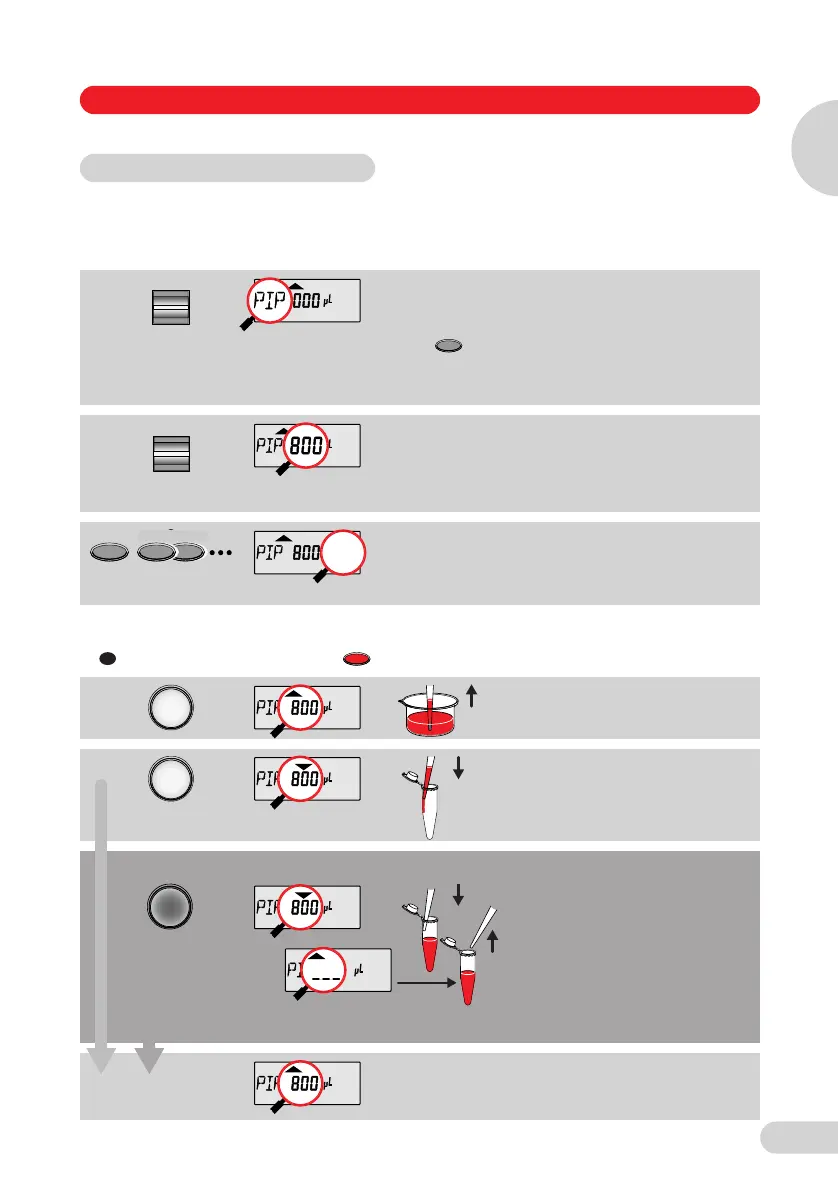
In the Standard mode, blow-out is executed automatically when liquid is dispensed.
The standard mode is recommended for rapid series pipetting with aqueous solutions.
Programming
Pipetting procedure
If PROG
appears in the
display: Press
the key
briefly until
PROG
disappears.
Activate the selection rocker until
"PIP" appears in the left side of the
display
.
Volume selection (here: 800 µl).
The volume rocker has two
pressure points for fast or slow
volume adjustment for up and
down.
If necessary, press the Option key
several times. In the Standard
mode, the display remains blank in
this case.
If appears in the display: Press the key briefly.
Liquid is aspirated.
Liquid is dispensed with blow-out.
If the Actuate key is held down
when liquid is dispensed, the
device returns to the basic
position when the key is released.
Note: Necessary when dispensing
into existing liquid:
Before releasing the key, remove
the pipette tip from the solution in
order to prevent any solution from
being aspirated unintentionally.
The pipette is now once again
ready to aspirate.
5.3 Pipetting in the standard mode
Select
Program
Volume
Option
Option
Option
R
R
Alternative pipetting procedure
➞
Operation
5 Operation
5
1_E05_1 Bedienung A5 Seite 15 Donnerstag, 9. Oktober 2008 7:13 19



 To Next Page