21
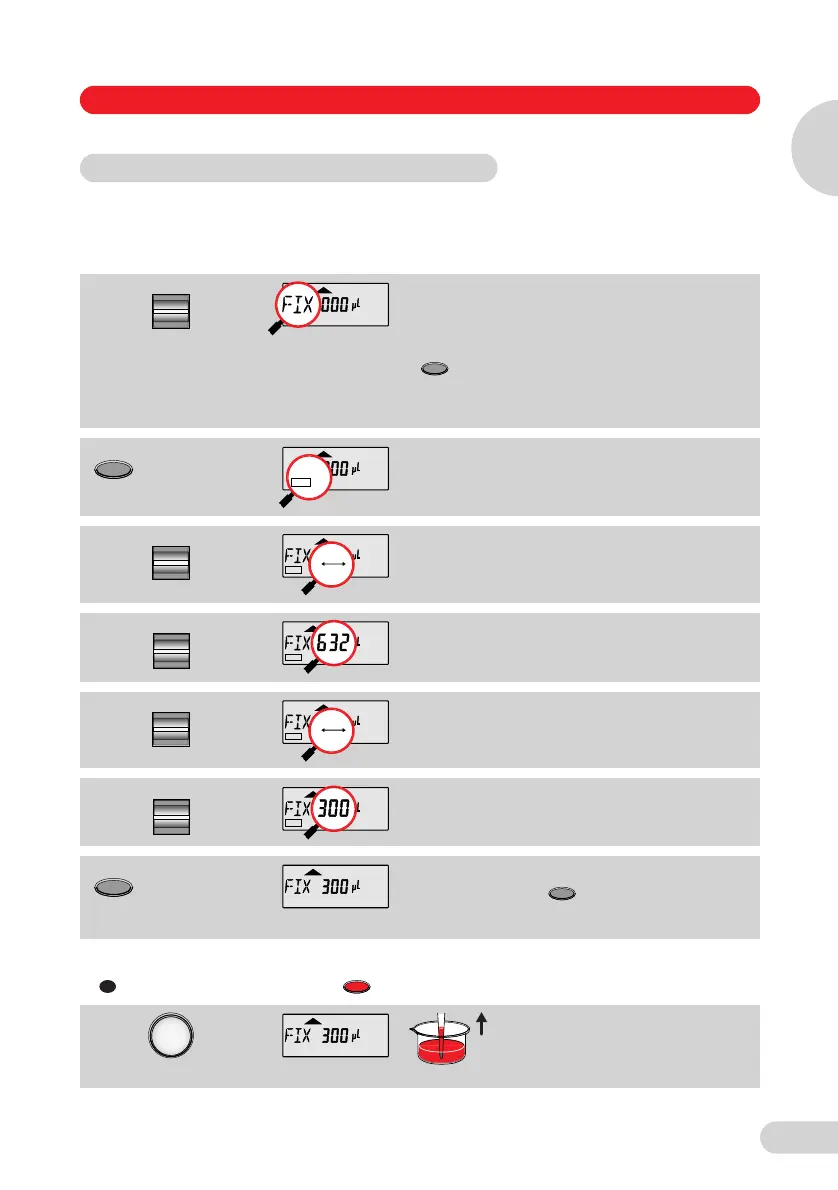
FIX is used to rapidly set five frequently used pipetting volumes.
Five FIX volumes are predefined in the pipette. FIX volumes can be changed via programming.
Programming FIX fixed volumes
If PROG
appears in
the display:
Press the
key
briefly until
PROG
disappears.
Select "FIX" for fixed volume.
Hold down the Program key until
EDIT appears.
The volume flashes.
Select the memory slot using the
Select rocker.
Using the Volume rocker, select the
volume for the memory slot
(here: 5).
Select the next memory slot for
purposes of changing the volume.
Define the next volume
(here: memory slot 3).
The program is ended by pressing
the key.
EDIT and the flashing volume
disappear from the display.
or
If appears in the display: Press the key briefly.
The selected volume is aspirated.
Programming is ended.
EDIT and the flashing volume
disappear from the display.
5.8 Pipetting with a preselected fixed volume (FIX)
Select
Program
EDIT
3
EDIT
3
Select
EDIT
12345
Volume
EDIT
5
Select
EDIT
12345
Volume
EDIT
3
3
Program
R
R
3
Operation
5 Operation
5
1_E05_1 Bedienung A5 Seite 21 Donnerstag, 9. Oktober 2008 7:13 19



 To Next Page