Testing the Printer
The self test prints the current DIP-switch settings, followed
by font samples for each of the printer’s available fonts.
5.
The self test continues until the paper runs out or until you
press the PAUSE button. When the printer beeps, you can load
another sheet of paper to continue printing font samples.
When you wish to stop the test, press the PAUSE button. To
resume the test, press the PAUSE button again.
6. Press the LOAD/EJECT button to eject the paper.
Then turn off the printer to end the self test.
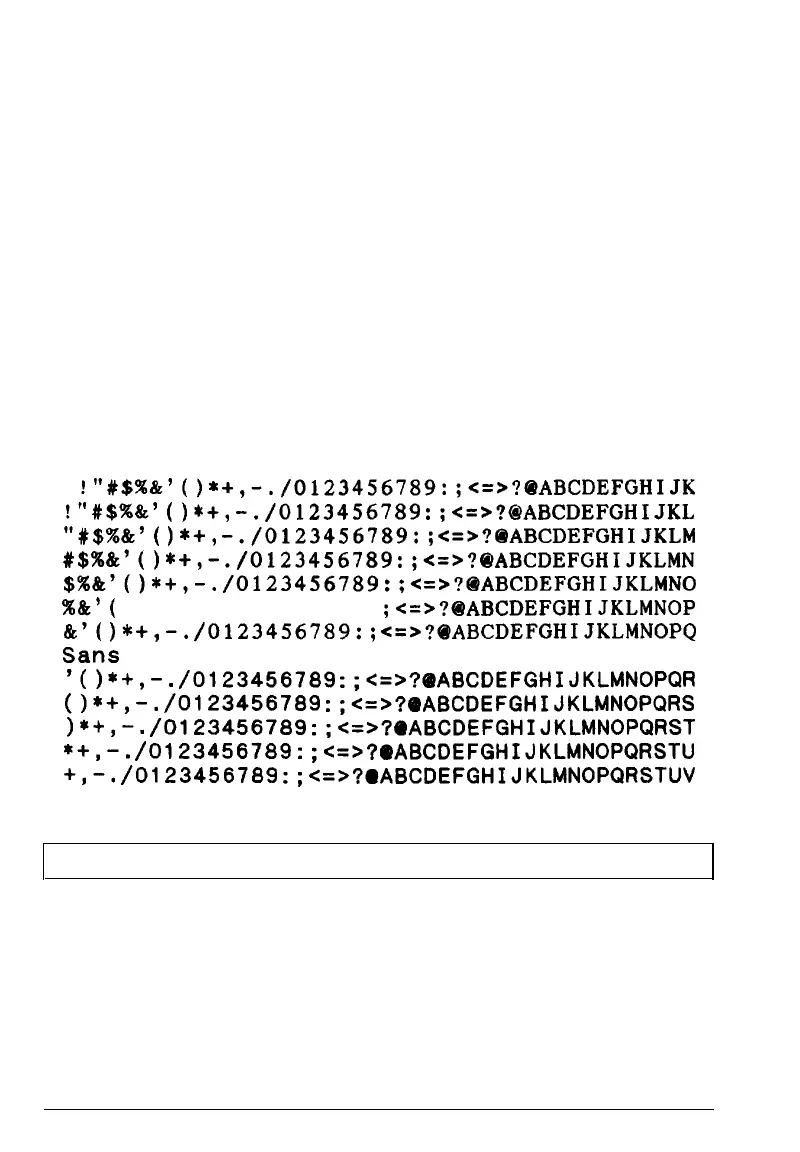
Here is part of a typical self test:
Roman
I”#$%&‘()*+,-./0123456789:;<=>?@ABCDEFGHIJK
~“#$x&‘()*+,
Lfl$%&‘(
)*+,
-./0123456789
:;<=>?BABCDEFGHIJKL
-./0123456789:;
c=>?@ABCDEFGHIJKLM
#$%8c’()*+,-
./0123456789
:;<=>?BABCDEFGHIJKLMN
$%L’()*+,-.
/0123456789:;<
=>?BABCDEFGHIJKLMNO
%&‘(
)*+,-./0123456789: ;<=>?@ABCDEFGHIJKLMNOP
I%‘(
)*+,-.
/0123456789:;
*=>?BABCDEFGHIJKLMNOPQ
Sans
Serif
‘(I*+,-.
/0123456789
:;c=>?BABCDEFGHIJKLMNOPQR
o*+,-•
/0123456789
:;c=>?OABCDEFGHIJKLMNOPQRS
)*+,-.
/0123456789
:;c=>?OABCDEFGHIJKLMNOPQRST
*+,-.
/0123456789:
;c=>?OABCDEFGHIJKLMNOPQRSTU
+,-.
/0123456789
:;c=>?mABCDEFGHIJKLMNOPQRSTUV
Note: If the self test does not print properly, see Chapter 6.
Setting Up the Printer
1-13










 To Next Page