Print Artist: Designing with Style 6-11
A
B
6
SSaving Your Cardaving Your Card
When you’re finished designing the card, follow these
steps to save it:
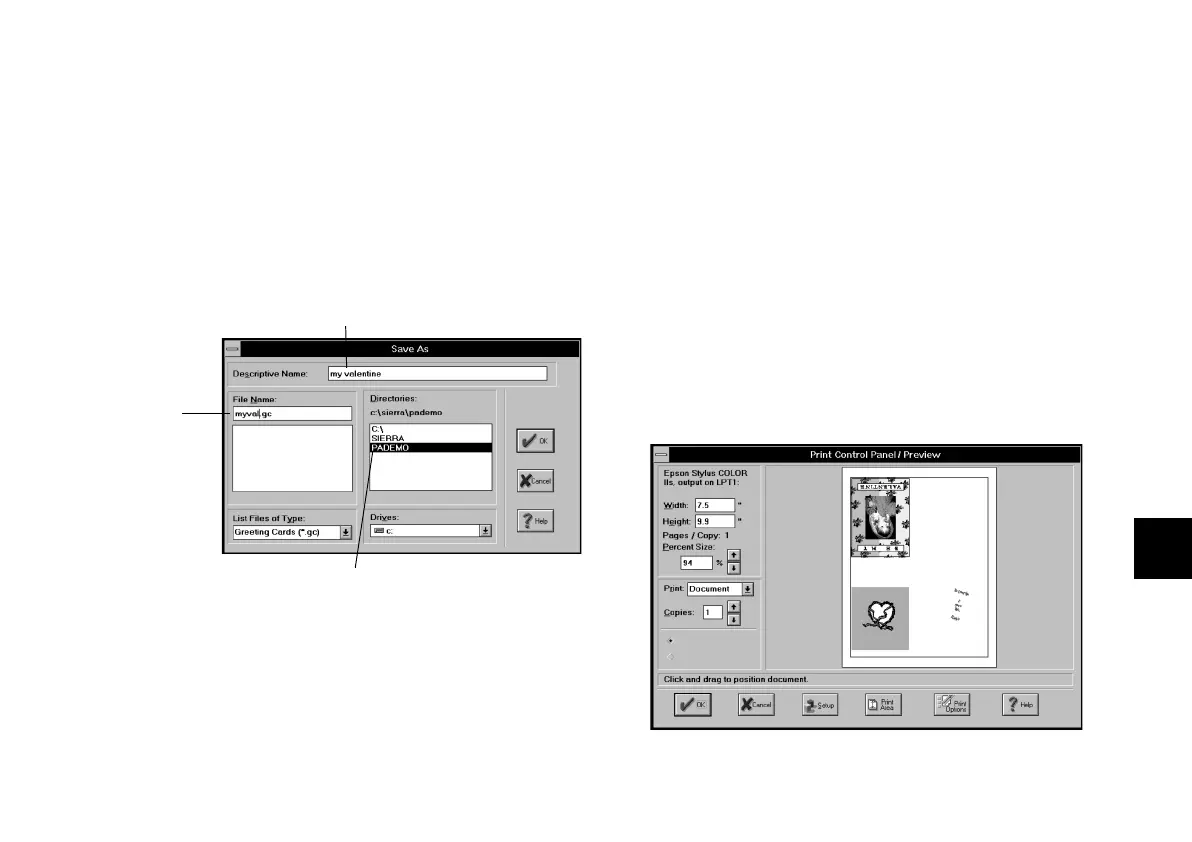
1 Click the Save button. The first time you save your
card, the Save As dialog box appears:
2 Type a descriptive name (up to 32 characters) for
your project.
3 Type a file name up to 8 characters long. Print Artist
automatically adds the .GC extension (for greeting
cards).
4 Click OK when you’re finished.
Printing Your Card and Exiting Printing Your Card and Exiting
After you save the card, you’re ready to print it. Follow
these steps:
1 Click the Print button. The Print Control Panel/
Preview window appears:
Default directory or folder where
Print Artist saves your projects.
Type description here.
Type file
name here.
php_6.fm5 Page 11 Monday, July 8, 1996 3:28 PM





 To Next Page