CardScan: Instant Address Book 8-9
A
B
8
Designing the LayoutDesigning the Layout
Before you print, you need to choose the format and
layout. Select a predesigned layout or modify a layout
to suit your needs. Follow these steps:
1 Click All to display your address list.
2 If you don’t want to print the whole list, enter
selection text in the Quick Search box. You can
select a single card, for example, by entering a
name. Make sure the list shows only the card or
cards you want to print.
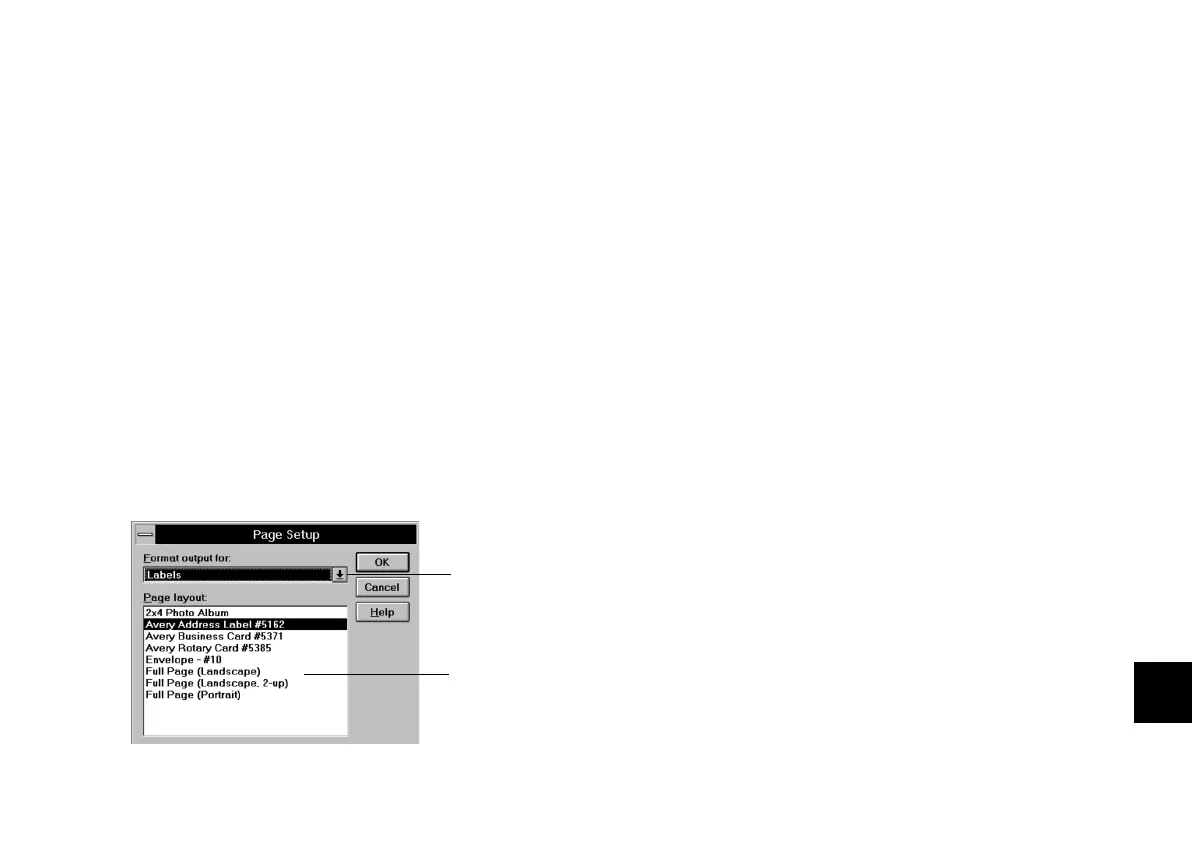
3 Choose Page SetupPage Setup from the File menu.
You see the following dialog box:
4 Click the down arrow and select one of the formats.
This determines what information to print for each
card.
5 Select the page layout you want to use. This
determines how the information will be printed.
6 Click OK.
Previewing and PrintingPreviewing and Printing
Before you print, it’s a good idea to check your format
and layout to make sure it looks the way you want.
Then you can either change it or just go ahead and
print. Follow these steps:
1 Choose PreviewPreview from the File menu to check the
format and layout you have chosen.
If you want to change the format or layout before
you print, click the Close button, choose Page Setup
from the FileFile menu again, and make different
selections.
Click to
choose format
for printing.
Select the
page layout
you want to
use.
php_8.fm5 Page 9 Tuesday, July 9, 1996 10:18 AM





 To Next Page