8-2 CardScan: Instant Address Book
Follow these steps:
1 From the Windows 3.1 Program Manager, double-
click the CardScan icon in the CardScan group.
In Windows 95, click Start, point to Programs, and
then point to CardScan. Click the CardScan icon.
The first time you use CardScan, you see a
registration screen.
2 You can choose to register immediately or at a later
time.
The first time you use CardScan, the Select Source
dialog box appears.
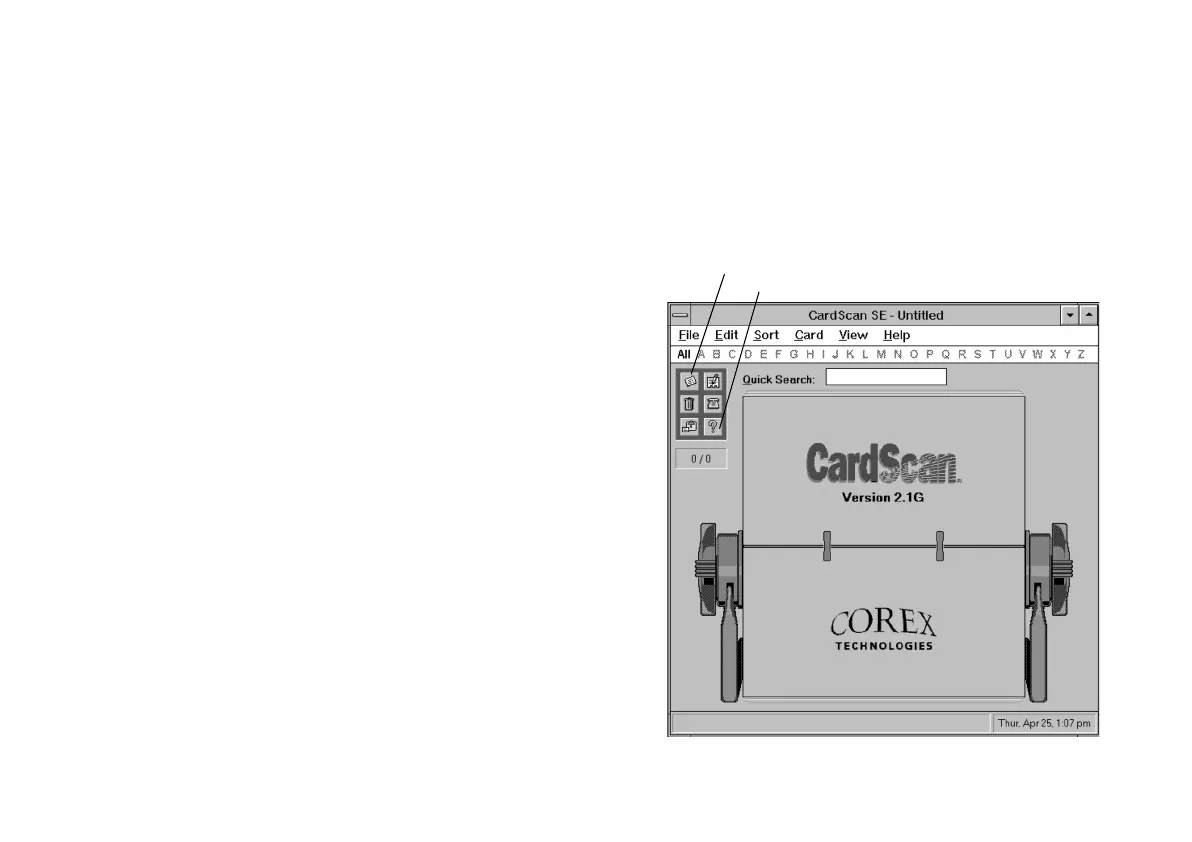
3 Select PhotoPlus Scan and click OK. You see the
CardScan opening screen, as shown on the right.
From this screen you can scan in your cards, edit the
information, view your address list, and use all the
CardScan features. If you need more information,
click the Help button or choose ContentsContents from the
Help menu.
N
Click to start scanning.
Click to get help.
php_8.fm5 Page 2 Tuesday, July 9, 1996 10:18 AM


 To Next Page
 Loading...