CardScan: Instant Address Book 8-5
A
B
8
6 Slide the Brightness control left to darken the image,
and click OK.
7 Click Transfer. CardScan saves the card image and
asks if you want to scan another card.
You can scan a series of cards, and then process
them all together, or scan and process each card
individually.
NOTE
To avoid overloading your system, don’t try to scan and
process more than 20 cards in one batch.
8 Click No to process the card you just scanned.
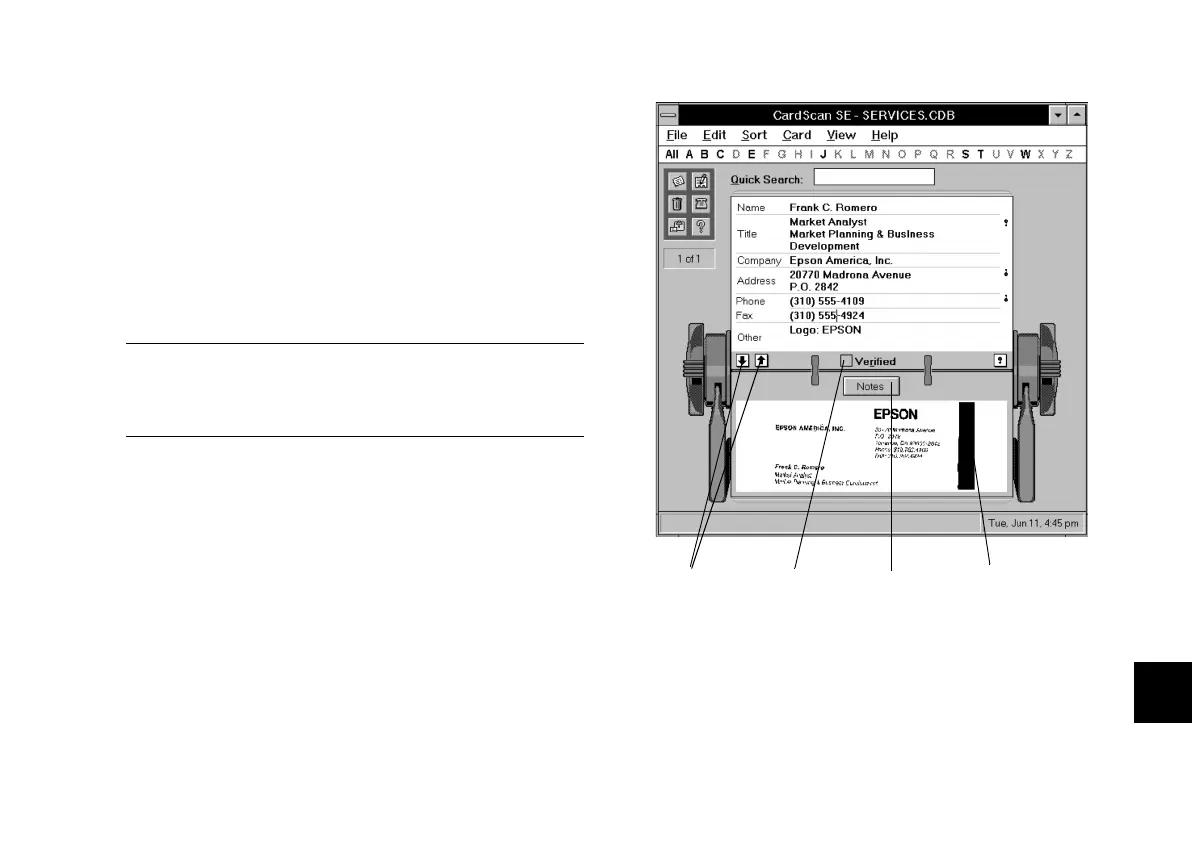
CardScan displays its progress as it processes the
card. When processing is complete, text appears in
the various fields on the screen, as shown to the
right.
Click to
add notes.
Click the left mouse
button to zoom in
on the image.
Click when
you’re finished
editing.
Click to
display next or
previous card.
php_8.fm5 Page 5 Tuesday, July 9, 1996 10:18 AM





 To Next Page