RX
-
8025
SA
/
NB
Page - 11 ETM10E-04
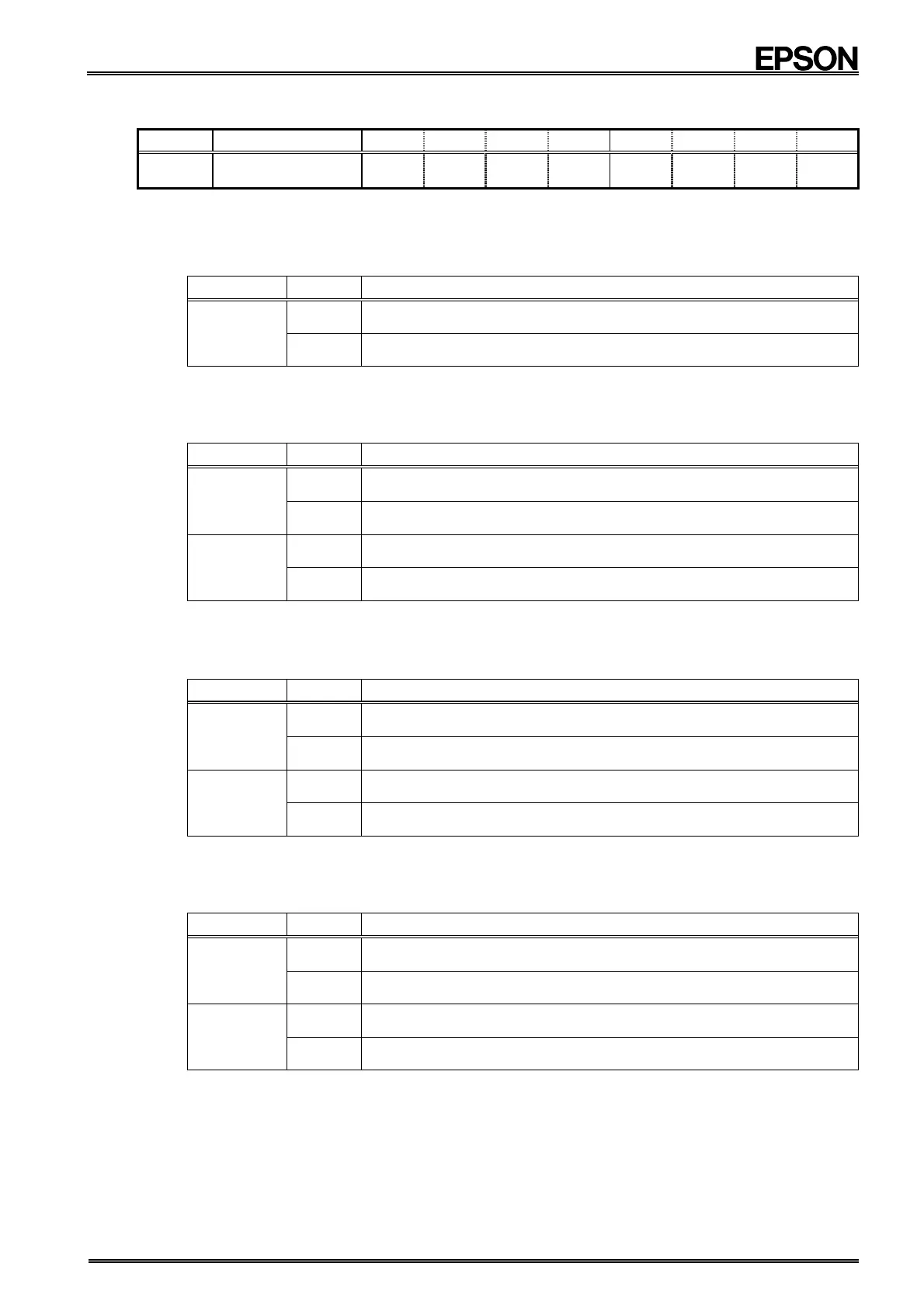
8.2.9. Control register 2 (Reg F)
Address
Function bit 7 bit 6 bit 5 bit 4 bit 3 bit 2 bit 1 bit 0
F Control 2 VDSL
VDET
/ XST
PON /CLEN1
CTFG
WAFG
DAFG
(Default) (0) (0)
(−)
(1) (0) (0) (0) (0)
∗1) The default value is the value that is read (or is set internally) after the PON bit has been set to "1," such as after powering up from 0 V or
recovering from a supply voltage drop.
∗2) '"−" indicates undefined status.
1) VDSL bit
This bit is used to set the power drop detection function's threshold voltage value.
VDSL Data Description
Write / Read
0
Sets 2.1 V as the power drop detection function's threshold
voltage value
∗ Default
1
Sets 1.3 V as the power drop detection function's threshold
voltage value
∗ For details, see "8.7. Detection Functions".
2) VDET bit
This bit indicates the power drop detection function's detection results.
VDET = "1" once a power voltage drop has occurred.
VDET Data Description
Write
0
Clears the VDET bit to zero, restarts the power drop detection
operation and sets up for next power drop detection operation
∗ Default
1
The writes "1" are invalid.
Read
0
Power drop was not detected
∗ Default
1
Power drop was detected
(result is that bit value is held until cleared to zero)
∗ For details, see "8.7. Detection Functions".
3) / XST bit
This bit indicates the oscillation stop detection function's detection results.
If a "1" has already been written to this bit, it is cleared to zero when stopping of internal oscillation is detected.
/ XST Data Description
Write
0
The writes "0" are invalid.
1
Sets the oscillation stop detection function as use-enabled and
sets up for next detection operation
Read
0
Oscillation stop was detected
(result is that bit value is held until a "1" is written)
1
Oscillation stop was not detected
∗ For details, see "8.7. Detection Functions".
4) PON bit
This bit indicates the power-on reset detection function's detection results.
The PON bit is set (= 1) when the internal power-on reset function operates.
PON Data Description
Write
0
Clears the PON bit to zero and sets up next detection operation
1
The writes "1" are invalid.
Read
0
Power-on reset was not detected
1
Power-on reset was detected
(result is that bit value is held until cleared to zero)
∗ Default
∗ When PON = "1" all bits in the Clock Precision Adjustment register and in the Control 1 and Control 2
registers (except for the PON and / XST bits) are reset to "0". This also causes output from /INTA and
/INTB pin to be stopped (= Hi-Z).
∗ For details, see "8.7. Detection Functions".


 To Next Page