RX
-
8025
SA
/
NB
Page - 15 ETM10E-04
8.4. Periodic Interrupt Function
Periodic interrupt output can be obtained via the /INTA pin.
Select among five periodic-cycle settings: 2 Hz (once per 0.5 seconds), 1 Hz (once per second), 1/60 Hz (once
per minute), 1/3600 Hz (once per hour), or monthly (on the 1
st
of each month).
Select among two output waveforms for periodic interrupts: an ordinary pulse waveform (2 Hz or 1 Hz) or a
waveform (every second, minute, hour, or month) for CPU-level interrupts that can support CPU interrupts.
A polling function is also provided to enable monitoring of pin states via registers.
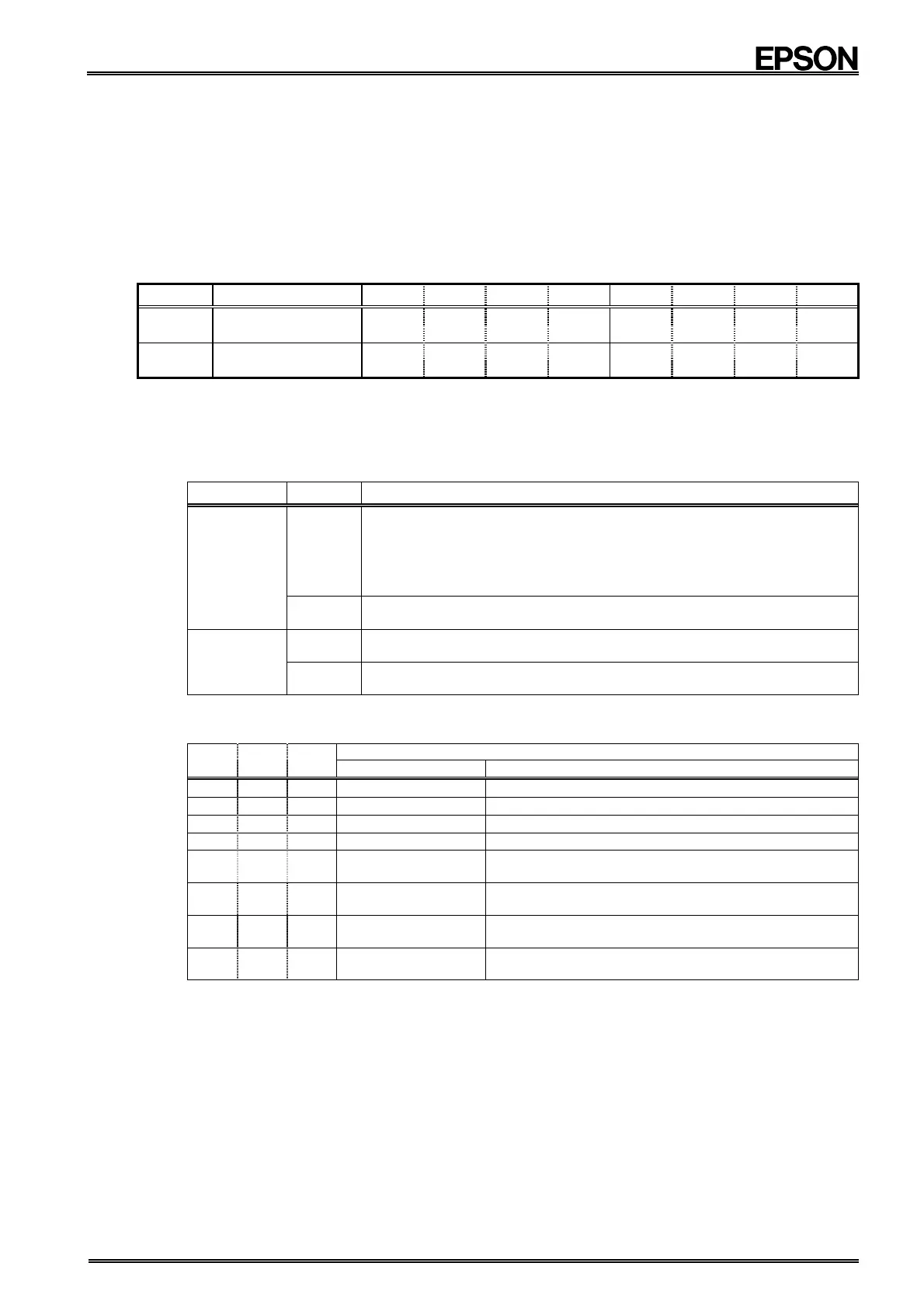
8.4.1. Related registers
Address
Function bit 7 bit 6 bit 5 bit 4 bit 3 bit 2 bit 1 bit 0
E Control 1
WALE DALE /12 , 24 /CLEN2
TEST
CT2 CT1 CT0
(Default)
(0) (0) (0) (0) (0)
(0) (0) (0)
F Control 2
VDSL VDET / XST PON /CLEN1
CTFG
WAFG DAFG
(Default)
(0) (0)
(−)
(1) (0)
(0)
(0) (0)
∗1) The default value is the value that is read (or is set internally) after the PON bit has been set to "1," such as after powering up from 0 V or
recovering from a supply voltage drop.
∗2) "−" indicates undefined status.
1) CTFG bit
During a read operation, this bit indicates the /INTA pin's periodic interrupt output status.
This status can be set as OFF by writing a "0" to this bit when /INTA = " L". .
CTFG Data Description
Write
0
A "0" can be written only when the periodic interrupt is in level
mode, at which time the /INTA pin is set to OFF (Hi-z) status.
(Only when Alarm_D does not match)
∗ After a "0" is written, the value still becomes "1" again at the
next cycle.
∗ Default
1
The writes "1" are invalid.
Read
0
periodic interrupt output OFF status; /INTA = OFF (Hi-z)
∗ Default
1
Periodic interrupt output ON status; /INTA = "L"
2) CT2, CT1, CT0 bit
Combinations of these three bits are used to change the /INTA pin's output status.
CT2
CT1
CT0
/INTA pin's output setting
Waveform mode Cycle / Fall timing
0 0 0
−
/INTA = Hi-z (= OFF)
∗ Default
0 0 1
−
/INTA = Fixed low
0 1 0
Pulse mode
∗1)
2 Hz (50% duty)
0 1 1
Pulse mode
∗1)
1 Hz (50% duty)
1 0 0
Level mode
∗2)
Once per
second
(Synchronous with per-second
count-up)
1 0 1
Level mode
∗2)
Once per
minute
(Occurs when seconds reach ":00")
1 1 0
Level mode
∗2)
Once per hour
(Occurs when minutes and seconds
reach "00:00")
1 1 1
Level mode
∗2)
Once per
month
(Occurs at 00:00:00 on first day of
month)
∗ The /INTA pin goes low ("L") when the Alarm_D function operates, but you can prevent that effect by
setting "0" for CT2, CT1, and CT0 to stop this function.
∗ See the next page's description of pulse mode/level mode waveforms.


 To Next Page