RX
-
8025
SA
/
NB
Page - 21 ETM10E-04
8.7.2. Oscillation stop detection
This function detects when internal oscillation has stopped. When an oscillation stop is detected, the /XST bit value
becomes "0". If a "1" has already been written to the /XST bit, the /XST bit is cleared to zero when stopping of
internal oscillation is detected, so this function can be used to determine whether or not an oscillation stop has
occurred previously, such as after recovery from a backup.
1) / XST bit
This bit indicates the oscillation stop detection function's detection results.
/ XST Data Description
Write
0
The writes "0" are invalid.
1
Sets the oscillation stop detection function as use-enabled and
sets up for next detection operation
Read
0
Oscillation stop was detected
(result is that bit value is held until a "1" is written)
1
Oscillation stop was not detected
2) Caution points
To prevent detection errors during operation of the oscillation stop
detection function, be sure to prevent stops due to V
DD
power flicker and
prevent application of voltage exceeding the maximum rated voltage to
any pin.
In particular, fluctuation in the supply voltage may occur as shown in the
figure at right, such as when a back-up battery is used. If this occurs,
internal data may be lost even when the / XST bit value has not changed
from "1" to "0" so be sure to avoid any input that contains large amounts
of chattering.
Example of voltage fluctuation that
makes oscillation stop hard to detect
V
DD
8.7.3. Voltage drop detection
This function detects when a voltage drop occurs. Detection of a voltage drop changes the VDET bit value to "1".
The threshold voltage value for detection can be set via the VDSL bit as 2.1 V or 1.3 V.
1) VDSL bit
This bit is used to set the power drop detection function's threshold voltage value.
VDSL Data Description
Write / Read
0
Sets 2.1 V as the power drop detection function's threshold
voltage value
∗ Default
1
Sets 1.3 V as the power drop detection function's threshold
voltage value
2) VDET bit
This bit indicates the power drop detection function's detection results. VDET = "1" once a power voltage drop
has occurred. This detection operation is then stopped and the bit value (1) is held.
VDET Data Description
Write
0
Clears the VDET bit to zero, restarts the power drop detection
operation and sets up for next power drop detection operation
∗ Default
1
The writes "1" are invalid.
Read
0
Power drop was not detected
∗ Default
1
Power drop was detected
(result is that bit value is held until cleared to zero)
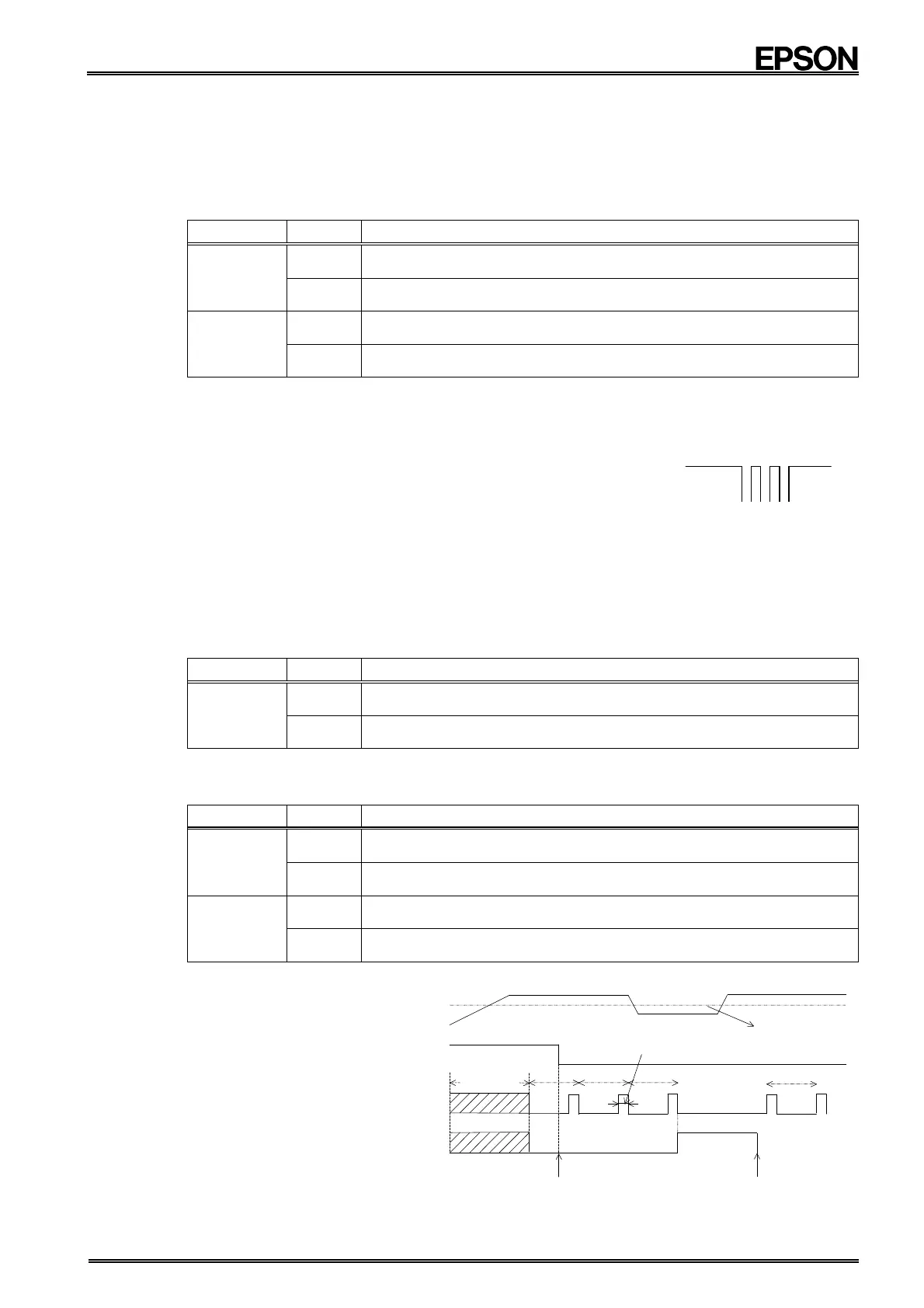
3) Caution points
To reduce current
consumption while
monitoring the supply
voltage, the supply voltage
monitor circuit samples for
only 7.8 ms during each
second, as shown at right.
Sampling is stopped once
the VDET bit = "1". (Clear
the VDET bit to zero to
resume operation of the
detection function.)
VDET
(D6 in address Fh)
PON
VDD
2.1 V or 1.3 V
1 s
Write 0 to
VDET
7.8 ms
voltage monitoring
period (1 to 2 s)
Write 0 to PON
& VDET


 To Next Page