19
Chapter 1
Getting Ready
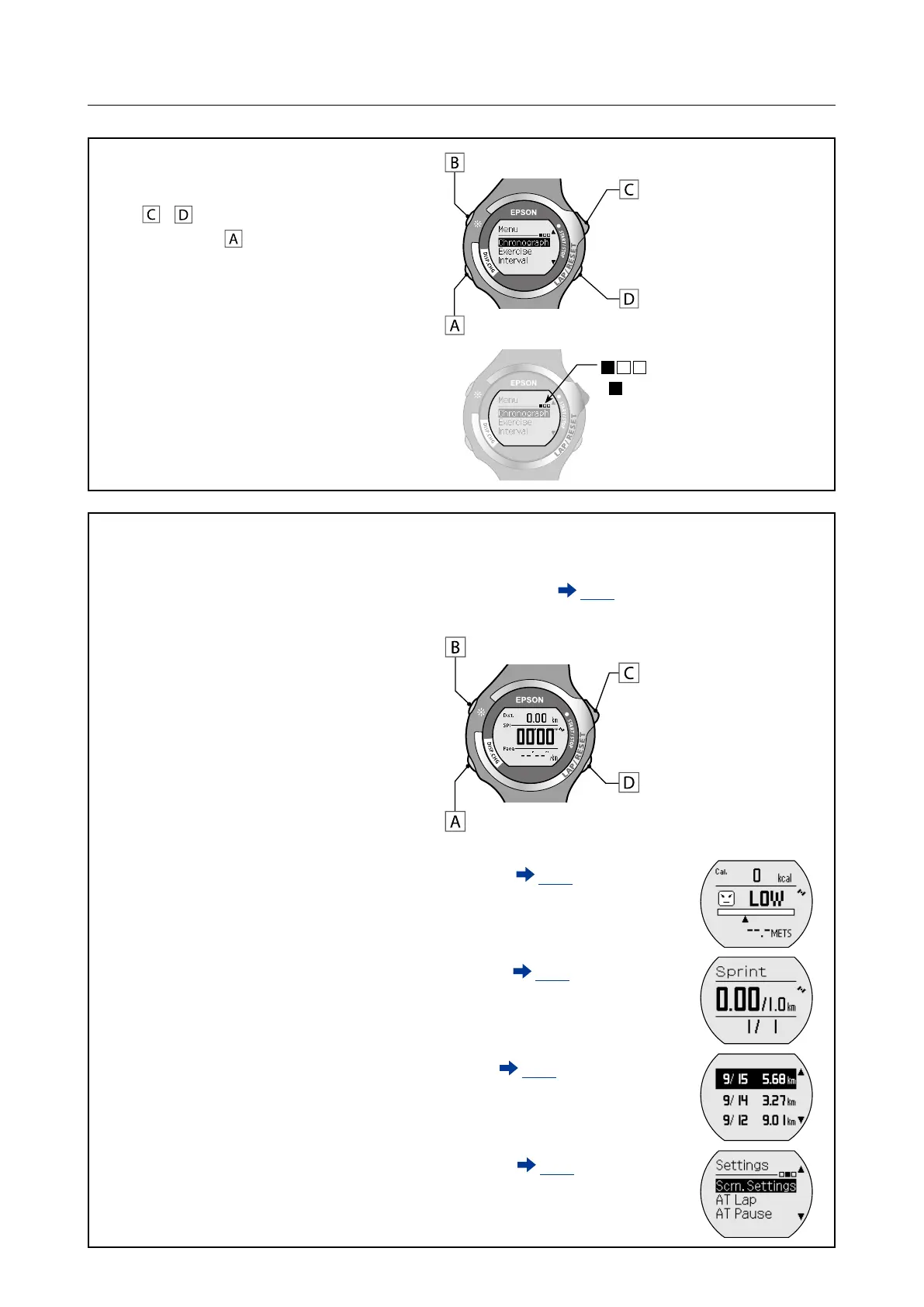
[Menu] screen
Select (top)
Select (bottom)
Conrm selection
Light on
Displays the [Menu] list.
Use
/ to highlight the target function,
and then press
.
Displays the [Menu] level
(
moves to the right as you
move through the menu screens.)
Measurement screen/Settings screen
Displays each function screen.
As well as the [Chronograph]
example screen, there are also
measurement and settings screens
for [Exercise], [Interval], [Recall], and
[Settings].
Example screen:
Chronograph ( P. 27)
Measure split times and lap times.
Start/Stop/
Restart measurements
Lap (measuring) /
Reset (stopped)
Change screens
Light on
Exercise ( P. 35)
Exercise while checking the
target pace.
Interval ( P. 43)
Repeat exercise for hard and
light workouts.
Recall ( P. 55)
Check measurement results.
Settings ( P. 73)
Change settings.



 To Next Page